Unzip Files Online Free

The simplest way to unzip your files online

Zip
File
Drag & drop zip or
single file here
Upload file
This site is protected by reCAPTCHA and the Google Privacy Policy and Terms of Service apply.
⭐️ 2,000,000+ happy users
Works in any browser · Trusted by teams at Salesforce, Airbnb, JLL, Nestlé

Unzip a file and share what's inside

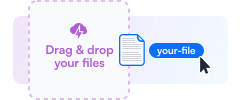
Tiiny Host opens a zip file online and publishes its contents. Each file gets its own link, so a PDF or photo from the archive opens straight in the browser. If the zip holds a website, it runs as that website.

Unzip a file and share what's inside

Unzip Your Files

In 3 Easy Steps

1. Locate your zip file

1. Locate your zip file

Navigate to your zipped files on your device.

2. Upload your zip file to Tiiny Host

2. Upload your zip file to Tiiny Host

Choose the "Upload Zip File" button and select your file.

3. Unzip your file and download

3. Unzip your file and download

Click Publish and receive a link to view your files.

Features

More than an extractor

⚡️️ Quick extraction

Files come out of the archive exactly as they went in, a few seconds after the upload.

🚫 No software required

Nothing to install on your computer or phone. The unzipping happens online.

🔐 Password Protection

On the Solo plan, a password keeps the unzipped files private to the people you choose.

📁 Manage Your Files

Your unzipped files stay in your dashboard until you replace or delete them.

🌍 Access from Anywhere

Because the files are online, you can open them later from another computer or your phone.

🔗 Shareable Links

Every file from the archive has a link you can paste into an email or a chat.

Compared

How Tiiny Host differs from a typical unzip tool

Sites like unzip-online.com extract an archive for you to download, which is ideal when the files are only for you. When they need to go to someone else, Tiiny Host keeps them online with a link for each one.

⚡ Tiiny Host
Online unzip tools
A link for each file
Every file from the archive can be opened or shared on its own.
✓ Yes
Download only
One link for the folder
The project link shows the whole archive on a single page.
✓ Yes
Rarely
Opens in the browser
PDFs and images display straight from their links, with no download needed.
✓ Yes
Some preview
Zipped websites run
When the archive holds an index.html file, it's published as a working website.
✓ Yes
Rarely
Replace the contents later
A new zip uploaded to the same project keeps the link your recipients already have.
✓ Yes
Start again
Password protection
Solo and higher plans can lock the files behind a password.
✓ Yes
Rarely
Files stay online
They remain available until you delete them.
✓ Yes
Usually temporary
Easier than others for unzipping files Unzip-online.comSmallPDF.comOnline2PDF.com
Pricing

Unzipping costs nothing up to 3 MB

Small archives unzip on the free plan and stay online with no end date, provided you log in every three months. Bigger zips need a paid plan.

Free
$0/mo, forever
  • ✓ 1 active project
  • ✓ Zip files up to 3 MB
  • ✓ 5,000 visits and 5 GB bandwidth a month
  • ✓ A link for every file
  • – Tiiny Host banner on shared pages
Upgrade when you need more
from $5/mo, billed yearly
  • Tiny $5 · no banner, 25 MB zips, QR codes, analytics
  • Solo $13 · 5 projects, 75 MB zips, password protection, custom domain
  • Pro $31 · 15 projects, 10 GB shared across them, email capture, team members
  • Pro Max $74 · unlimited projects, 2 TB for large archives
See all plans → ⭐️ 7-day money-back guarantee

Zip size limit per plan

Per-file upload limit by plan
Free
3 MB
per zip
Tiny · $5
25 MB
per project
Solo · $13
75 MB
per project
Pro · $31
10 GB
account limit
Pro Max · $74
2 TB
account limit

A folder of documents or photos rarely goes past 25 MB once zipped. Video and design files are a different story, and on Pro or Pro Max one archive can use most of a shared 10 GB or 2 TB allowance.

Archives people unzip with Tiiny Host

Large Files

Large Files

Paid plans handle big zips, up to 75 MB per project on Solo and 10 GB across the account on Pro.

Multiple Files

Multiple Files

A zip full of contracts or photos becomes one page listing everything in it.
Project Archives

Project Archives

A client handover, unpacked so the whole team can open the files without an unzip app.

Resources

Guides for working with zip files

How to Zip a File on Mac

The built-in way to compress files on macOS, using Finder.

Unzip Files on Mac: A Step-by-Step Guide

Opening zip archives on a Mac with the tools that ship with macOS.

How to Zip a PDF File

Shrinking PDFs into a zip so they're easier to store and send.

Frequently Asked Questions

How can I unzip a file for free?

Upload the zip to Tiiny Host on the free plan, which handles archives up to 3 MB. The files are unpacked for you, each with its own link.

Can you unzip a file online?

Yes. The whole process happens online, so it works on computers and phones without extra software.

How to open a ZIP file in a browser?

Upload it to Tiiny Host. Once it's unpacked, the contents open from their links like any web page.

Can I unzip large files online?

With a paid plan, yes. Tiny accepts zips up to 25 MB and Solo up to 75 MB. For anything bigger, Pro and Pro Max give you 10 GB and 2 TB across the account.

What happens to my files after I unzip them?

They stay in your Tiiny Host account, each with a link, until you delete the project. A free account keeps them online as long as you log in at least once every three months.

Can I share the files from my zip?

You can share the project link, which shows every file, or copy the link of a single file. On Solo you can add a password first.

What if my zip file is a website?

A zip with an index.html file is published as a working site at its own address. Zips that contain HTML files but no index.html can't be published until you add one.

Try unzipping your files online for free