The simplest way to publish your course

Publish your Articulate 360, Storyline or Rise export on your own custom domain in seconds. Built-in analytics, password protection and autogenerated QR codes included.

Free to start · No credit card

Used by learning and enablement teams at

Salesforce Airbnb Cushman & Wakefield JLL Nestle Cognizant
From export to enrolled

Focus on designing, not publishing

You're time is better spent on designing courses, not publishing them.
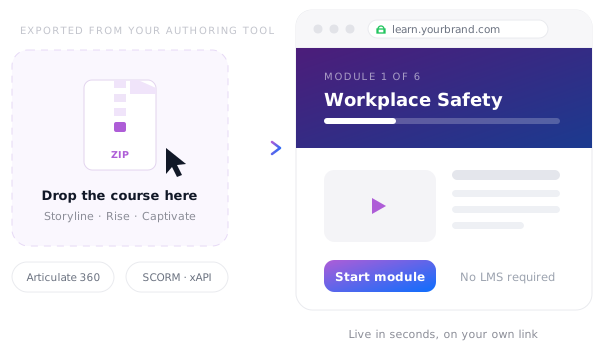
An exported Articulate 360 course zip being dropped onto Tiiny Host and opening as a live course on its own link
Drag and drop

Drag, drop, and deploy

Just drag & drop your exported course from Articulate 360, Storyline, or Rise to publish your course online. No complex S3/AWS setup.

  • Drag and drop the exported zip
  • Upload large courses with video
  • No LMS or no seat licences required
  • No S3 technical setup
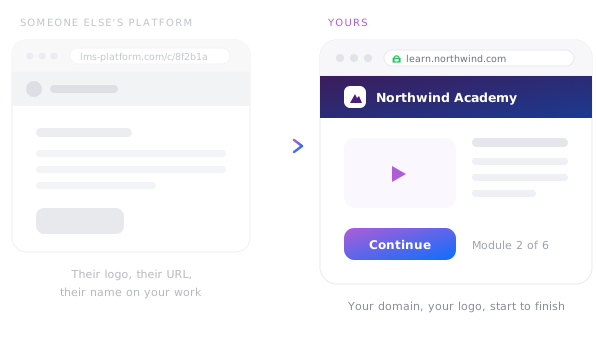
A generic platform-branded course URL compared with a fully branded course on the organisation's own domain
Custom branding

Your course, with your brand

Publish your courses online using a custom domain for a fully white-labeled experience.

  • Publish on your own domain
  • Your logo, no platform branding
  • A clean, memorable URL
  • Or embed it in your site
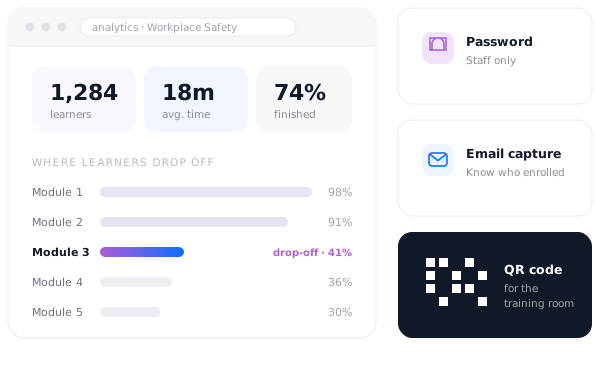
Visitor analytics showing learners, completion and time spent, alongside password protection, email capture and a QR code
Insight & access

Easily track engagement

Track views with built-in analytics, capture emails for enrollment tracking, and generate QR codes for easy physical access.

  • Built-in analytics
  • Secure with a password
  • Know who enrolled
  • QR code access

What learning teams publish on Tiiny

Courses, onboarding and training material — live on a link instead of locked in a platform.
Articulate 360 course
Articulate 360 course Zip upload · custom domain
Employee onboarding
Employee onboarding Web page · password protected
Compliance training
Compliance training Course · completion analytics
Workshop handout
Workshop handout PDF · QR code in the room
Course catalogue
Course catalogue Collection · one link
Student resource hub
Student resource hub Web page · shared with a cohort
I just uploaded my files and the website was live. And that's what I wanted.
★ ★ ★ ★ ★
Yash Bora Finance professional, Berlin
Read the story →
I can create a fully branded HTML in 15 minutes on an LLM and have it live within a few seconds.
★ ★ ★ ★ ★
Tim Thompson Founder, Blenda
Read the story →
Everything else I looked at basically required developer resources or was too basic/complicated.

★ ★ ★ ★ ★
Robert Robert Designer

Frequently Asked Questions

Which authoring tools does this work with?

Anything that exports a web package. Articulate 360 — including Storyline and Rise — is the common one, and Captivate and other SCORM or xAPI exports work the same way. Export for web, drag the zip across, and the course runs on its own link.

Do I need an LMS?

No. If you don't require centralized grade tracking, an LMS is often unnecessary. We provide hosting, custom branding, access control, and engagement analytics without the complex administration or per-seat pricing.

Can learners access it on their phone?

Yes. The course opens in a browser on any device with no app to install and no account to create. Every link also comes with a QR code, so you can put a code on a handout or a screen in the training room and let people scan straight in.

Can I put my own branding on the course?

Yes. Connect your custom domain and add your logo so learners go to your own address and see your organisation throughout. There's no platform branding sitting over the top of the course you built.

What do the analytics tell me?

You'll see how many learners opened your course, their average time spent, traffic sources, and specific drop-off points. This allows you to identify exactly which modules need improvement based on real learner behavior.

Can I restrict a course to one cohort?

Yes. Add one-click password protection and share the password with your cohort, so the course isn't open to anyone with the URL. You can also turn on email capture to record who enrolled. All uploads and downloads are encrypted with industry-standard TLS/SSL.

How do I update a course after publishing?

Re-upload the corrected export and the link stays identical, so the URL already sitting in your learners' inboxes shows the new version immediately. There's no re-publishing step and no downtime while it swaps over.

Publish your course today