

- What are These Two Tools, Really?
- The Use-Case Guide: Which Tool is Right for You?
- Feature Comparison: GitHub Pages vs Tiiny Host
- A Few More Things to Consider
- Frequently Asked Questions
- Can I migrate from GitHub Pages to Tiiny Host?
- Is GitHub Pages actually free?
- What is the difference between GitHub and GitHub Pages?
- Do you need to know how to code to use GitHub Pages?
- Can Tiiny Host replace GitHub Pages for a developer?
- What file types does Tiiny Host support?
- Can I use GitHub Pages for a business website?
- Can GitHub Pages host a React app?
- Does Tiiny Host expire?
- Which is better for a portfolio?
- The Final Verdict
If you go on searching for “free website hosting”, you will find GitHub Pages recommended multiple times. It is one of the best hosting platforms out there. GitHub Pages is free and doesn’t require a credit card either.
When you dig deeper, though, you realise that you need technical knowledge to get a single static website live. You need to understand “git repositories” and “branches,” download Git on your computer, test your site locally, and learn git management.
That can get overwhelming, especially if you just want a page online. Tiiny Host can help to do that in less than two minutes.
GitHub Pages and Tiiny Host publish websites, and that’s why people compare them. In reality, they serve different sets of people, and so they aren’t competitors.
One is a developer tool that allows you to publish a website for free. The other is a publishing tool that lets anyone publish a file online without technical knowledge.
This article will help you decide which one is best for you.
By the end of this article, you will know
- Which tool matches your situation
- The setup process for both tools
- Features each tool offers to help you out
This will help you find the best tool online to get your website online without the help of a developer or IT department.
The Simplest Way to Decide on Self-Hosting
Choose Tiiny Host if:
You have a file and want it online now. No Git. No setup. No learning curve. Under 60 seconds
Choose GitHub pages if:
You already use GitHub, your content lives in a repo, and you want free, version-controlled, developer-native hosting.

What are These Two Tools, Really?
GitHub and GitHub Pages

GitHub is a cloud-based platform where developers can store, share and collaborate on different codebases. Developers and IT companies use GitHub to save their files. It is based on the version control system Git, which lets you track changes to a project.
GitHub Pages is a free static site hosting service, a service offered by GitHub. GitHub Pages takes static content like HTML, CSS and JavaScript files already present in a git repository and shows them as a static website. GitHub provides some space and a custom subdomain for your website so that you can go from code to URL.
This helps you share personal and project sites. These can range from being a student with a portfolio, a website for a small business or single-page applications.
The platform is built for developers and other tech professionals. It has proven to work the best for documentation sites, static websites and project pages. With GitHub’s built-in static site generator Jekyll, the sites can get online quite fast.
Jekyll is a static site generator. It is a tool that automatically converts templates and text files into a ready-to-publish website.
GitHub Pages provides a subdomain, supports custom domains, and includes free SSL for security. Unlike Cloudflare Pages or other tools, it does not require you to configure things on your own. Files are served via GitHub’s global CDN, which improves load times. The prerequisites are a GitHub account and basic knowledge of Git, GitHub, and repositories.
Tiiny Host
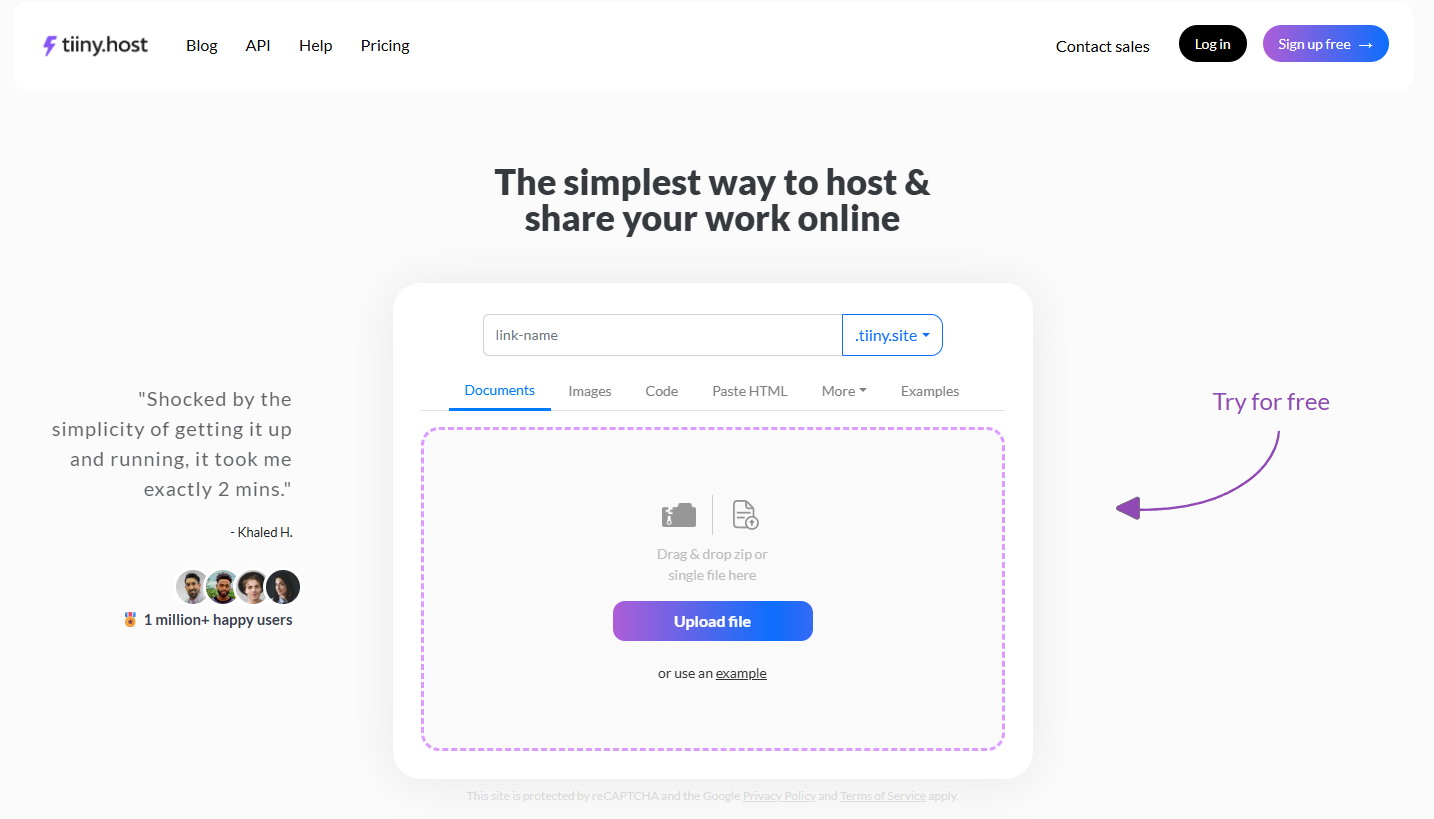
Tiiny Host is different from GitHub Pages. It is a drag-and-drop publishing platform. You do not need to go through a learning curve to get a URL for your website. You can upload a file - HTML, ZIP, or PDF - and get it hosted online within a few minutes.
You do not need to learn about repositories and the command line. If you still want version control for your application, you can use Tiiny Host’s extension in VS Code. With the extension, you can publish directly from your tool.
You get a custom subdomain for your website and free SSL to maintain its security. Even with the basic $5/month plan, you unlock features like built-in analytics and QR code generation. These features are typically added as third-party integrations on other platforms.
You can get your website online within minutes, but with paid plans, you also get:
- Password protection
- Custom domain support
- Built-in visitor analytics without any third-party integration
- Email Capturing for lead gating
- QR code generation for the links
- Link tracking that allows you to track visitors by the UTM attached
On Tiiny Host, you do not need to learn any technical skills. You can set up everything from the dashboard without dealing with complex configurations. Tiiny Host also offers a global CDN that helps your files load faster.

While you can get a website to a URL within a few seconds, Tiiny Host is not limited to that. You can make a website from a PDF, get a link to a collection of images, or literally any file format.
Key Difference: GitHub Pages is a developer-focused tool that helps you manage a large codebase and publish a website. There is a learning curve for the platform. Tiiny Host is for everyone: you can just upload and take it live via a URL.
The Setup Difference: Auto deploy vs Drag-and-Drop
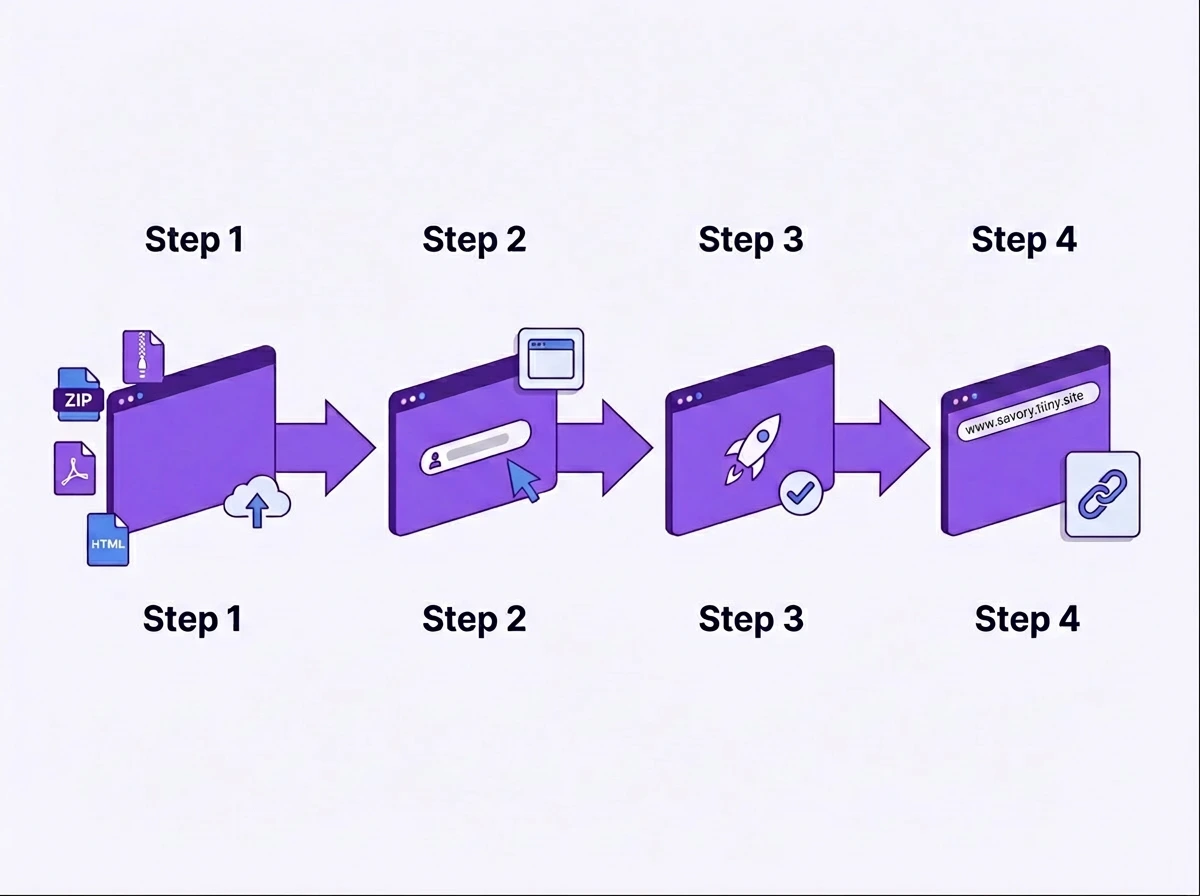
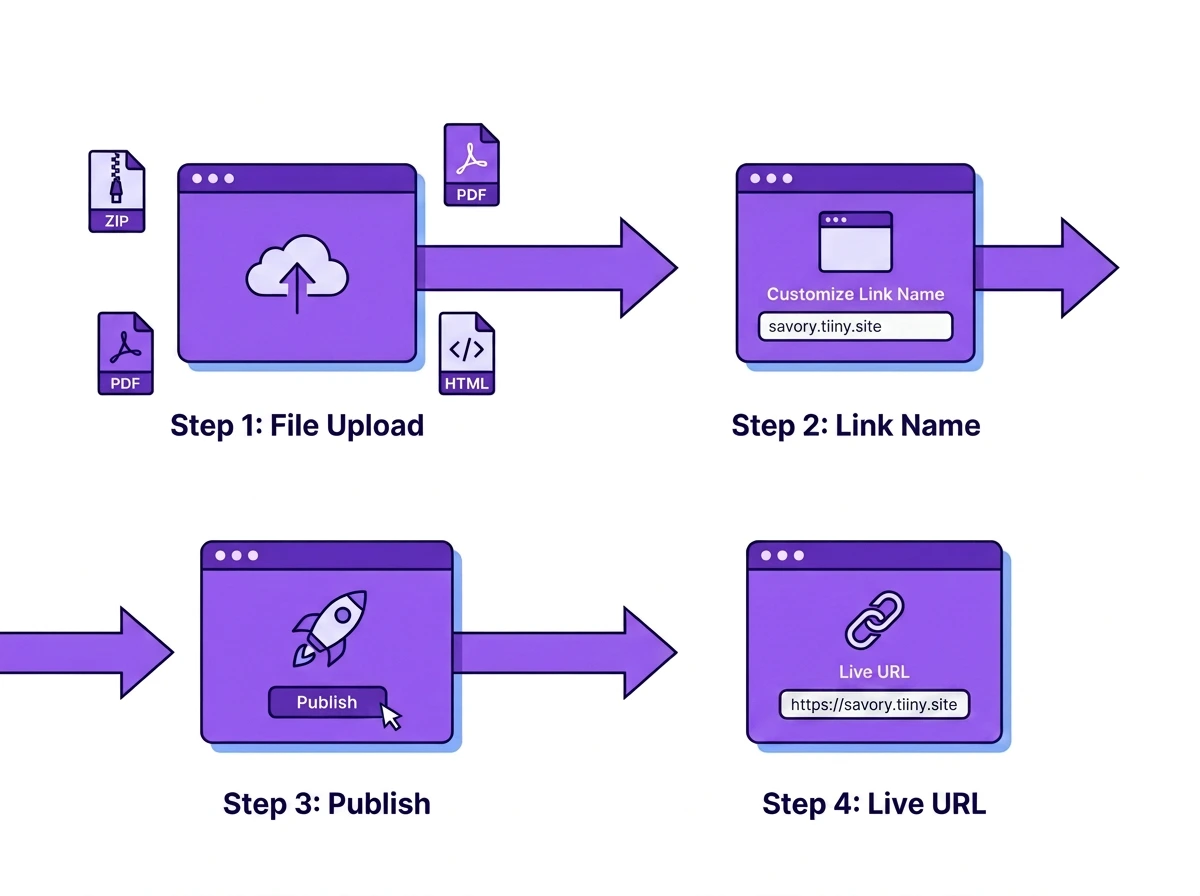
More than the feature list, the more important thing is how easy it is to use the tool to get your website live. Here’s what the steps look like when you have to convert a page from HTML to a URL.
| GitHub Pages: 6+ steps | Tiiny Host: 4 steps | |
| Step 1 | Create a GitHub account & verify email | Go to tiiny.host |
| Requires: email, 2FA setup | ||
| Step 2 | Create a new git repository (named correctly) | Drag your file into the upload box |
| User sites must be namedusername.github.io | ||
| Step 3 | Upload files (web UI or Git CLI) | Type a custom link name |
| Git CLI requires installation & configuration | Or leave blank for auto-generated URL | |
| Step 4 | Go to Settings → Pages → choose branch | Click Upload → share your live URL |
| Must know which branch holds your files | No account required on the free tier | |
| Step 5 | Wait for deployment (1–10 min) | |
| No real-time build feedback on the free tier | ||
| Step 6 | Custom domain setup (if needed) | |
| DNS edits, CNAME file, SSL verification |
The steps you follow while working with both showcase the difference. On top of these six steps, it is also assumed that you understand the technical terms. From steps 2 to 5, you have to work with the repository and understand what branches are and what the file structure means.
If you are already a developer, you may already know how to work with GitHub. Or, if you want to be involved in the tech domain, it is worth learning a tool you should learn. Apart from these, for everyone, there is a real learning curve.
Others do not need to learn the tools and terms as well because they are of no use. You do not need to work with a terminal or tools.
One thing to know about GitHub Pages before you start is the “public by default limitation: On free personal accounts, you need public repositories to use GitHub Pages. If you need publishing from a private repo, you need a paid GitHub plan. Regardless of the plan you choose for the repository, your published site is going to be publicly visible.
Custom Domain for your website
Both tools give you a custom subdomain that you can use.
GitHub Pages gives ‘username.github.io/repository-name’ as the default name, and Tiiny Host gives your preferred name.tiiny.site.
If you are a developer, the default link by GitHub pages will showcase your experience with the tool. This is a good signal, especially for technical audiences.
For freelancers sending a proposal to a client, or for students or professionals sharing a portfolio, a URL is the first impression. The subdomains aren’t bad, but you should get a custom domain if you want more personalisation.
Both platforms support custom domain names. If you are planning to publish your portfolio or have a commercialised website, consider switching to a custom domain.
Note: GitHub’s TOS restricts users from using GitHub pages for commercial use, so keep that in mind if you are looking to put company websites online through GitHub.

The Use-Case Guide: Which Tool is Right for You?
Now that you know the basics of both of them. Let me help you choose theright tool foryoure use case. GitHub Pages is the right answer for some people. For some, they do not need to learn GitHub Pages; Tiiny Host can handle the work for them.
Instead of considering and comparing them for each use case, let’s actually see where they fit.

Freelancers, Consultants and Agencies
The main reason you need a URL is to get a page live for an event or share an important document. Whether you are sharing proposals for a project, reports for the year, sharing creative work or sharing deliverables to file, you don’t need to learn technical terms.

You want to share a file through email or through social media using a link, where they can click and see things in one go. The appropriate choice here would be Tiiny Host.
Your site goes live within seconds. You do not have to keep them public all the time. When you are sending sensitive information, you can password-protect the file.
Then there are built-in analytics that can help determine whether the client viewed it. If it is a campaign website, you can see how well it’s performing. You can also attach custom domains if needed for more personal branding and identity.
Students and Academics
Here, the tool you have to choose will depend on your goal.
If your deadline is today and you have never used VS Code and the terminal before, Tiiny Host is the choice for you. You can get your portfolios or documents online within minutes.
If you are a Computer Science or web development student who wants to continue working in the same field, you should learn GitHub. You can add experience with Git and GitHub to your CV by learning them. Once learned, you can upload your portfolio directly to GitHub Pages.
It is a great way to learn workflow and results end-to-end.
Developers and Technical Users
If you fall into one of these two categories, GitHub Pages should be your choice. You can use Tiiny Host for specific use cases, though.
If you are already using GitHub daily, GitHub Pages will already be familiar to you. You already have repositories on which you have to work. The deployment cycle of making a change in code to getting it live would be helpful for coders and developers.
You can still use Tiiny Host for specific use cases. You can use it to publish client-facing prototypes, share PDFs with a link or landing pages that don’t need to be in repositories.
Marketers, Creators and Small Businesses
You would need hosting for landing pages, campaign microsite, menus or price list online. There is no need for a developer or IT department when you can use Tiiny Host.
With GitHub Pages’ Terms of Service, you cannot use the published sites for commercial or business use.
Tiiny Host can be used for commercial use. It is perfect for taking a landing page live or for building your email list with a lead magnet. Tiiny Host’s features like email capture, password protection and QR code maker are useful for people.
Sharing a Document or PDF
Tiiny Host is the clear choice here.
It was made to share your documents online. Whether you are worried about sharing a large file online or worried about file size while sharing a file through email, you can use Tiiny Host. The recipient doesn’t have to sign up for the tool either when you share.
You can password-protect and view analytics for important files, such as reports, brand files, or other documents.
Publishing or Updating From Your Phone
If the only device you have is your phone and you need to get a document live, Tiiny Host can help. You can open the site, upload your file and publish it. You can share the link with anyone and they can open it on their phone too.
GitHub Pages does not have a mobile-friendly workflow. You need a laptop or a desktop to use it.
Feature Comparison: GitHub Pages vs Tiiny Host
Here is a quick table that compares GitHub Pages and Tiiny Host, with everything you need to make the choice.
| Feature | GitHub Pages | Tiiny Host |
| Free tier | ✓ Public repos only | ✓ 1 project |
| Setup time | 5–20 minutes | Under 60 seconds |
| Git/coding knowledge required | Yes — required | None |
| Custom domain | ✓ | ✓ Paid plans |
| SSL / HTTPS | ✓ | ✓ |
| Password protection | ✗ | ✓ Solo plan+ |
| Built-in visitor analytics | ✗ | ✓ Tiny plan+ |
| PDF hosting (in-browser render) | Download only | ✓ All plans |
| Email capture/lead gating | ✗ | ✓ Pro plan |
| QR code generation | ✗ | ✓ |
| Multiple independent projects | One user site + project sites | ✓ Paid plans |
| Mobile publishing | No real workflow | ✓ Works from browser |
| Commercial use (ToS) | Restricted | ✓ Permitted |
| Version control / Git integration | ✓ Core feature | ✗ Not applicable |
| CI/CD and GitHub Actions | ✓ | ✗ |
| File size limit (free) | 1 GB repo limit | 3 MB upload |
| Bandwidth | 100 GB/month (soft) | Free: 5 GB/mo, Tiny: 10 GB/mo, Solo: 50 GB/mo, Pro: 100 GB/mo |
Pricing: What Does Each Actually Cost?
Both tools offer free hosting options. They allow you to publish small static sites at no cost. For larger sites, you might have to upgrade beyond the free plan. For Tiiny Host, you might need to upgrade to a plan to get more features.
For simple sites, the free or basic plan is good. Once you have tested it out, you can upgrade to a different plan.
GitHub Pages
| Plan | Price | Condition |
| Free | $0 | Public repositories only |
| GitHub Pro | $4/month | Required for private repository publishing |
The cost that would add up further is the price of the custom domain name you choose. While GitHub Pages offers free hosting, the problem is the setup, which can take more than a few hours or even days.
Tiiny Host
| Plan | Price | Projects | Upload Limit | Monthly Visits | Key Features |
|---|---|---|---|---|---|
| Free | $0 | 1 | 3 MB | — | Basic hosting, Tiiny Host banner |
| Tiny | ~$5/month (billed annually) | 1 | 25 MB | 10,000 | Analytics, QR code generation, no banner |
| Solo | ~$13/month (billed annually) | 5 | 75 MB | 100,000 | Custom domain, password protection |
| Pro | ~$32/month (billed annually) | More | Higher | Higher | Email capture, lead gating, agency use |
A Few More Things to Consider
Version Control
Some pages need constant updates over time. For content like static sites or applications where developers regularly update code, GitHub Pages’ Git-based workflow has an advantage. You can roll back to an older version of the website if it crashes or the changes don’t look good.
You have the advantage of branches, preview and testing before you publish if you use GitHub pages. Updates are automatically deployed to the website as commits are pushed.
If your content is in PDF or report format, Tiiny Host can be beneficial. You can update the content and push it to the same website. If the code keeps changing frequently, you can try the VS Code extension, but GitHub would be more useful here.
Static Sites in Practice
If you are publishing a file, both GitHub Pages and Tiiny Host host static content. That means you can get HTML, CSS, JavaScript, and assets online. Neither of them runs server-side code.
For most websites or single-page applications out there, these tools will work fine for you. It is good to know the limitations beforehand.
You can have built-in forms and actionable buttons on your website, but to save them, you need to connect third-party services and a database.
These platforms will work best if you want to share:
- Portfolios with recruiters
- Documentation, whitepapers or research papers
- Blogs
- Informational Sites
- Resumes
The recipients won’t even need to sign up anywhere to see these. For dynamic content, you need to add additional services.
File Formats and What Each Platform Handles
GitHub Pages works best with code files. This means file formats like HTML, CSS, JavaScript, and Markdown with Jekyll will work the best. Developers won’t need to work with any other website files in the majority of cases.
For website code files and many other formats, such as PDFs, Canva Exports, Adobe Illustrator files, Figma prototypes, PHP files, pitch decks, image collections, and more, Tiiny Host works flawlessly.
So any file that you have can be handled by Tiiny Host.
Privacy and Access Control
GitHub Pages sites will always be public. Whether the repository is private or public, the final URL remains accessible to everyone. Currently, there are no access-gating or authentication features unless added in the code.
Tiiny Host, on the other hand, has password protection built in natively. So your confidential documents, client work, and anything that needs gating can be walled off with a password. There are also options for “Email Capture,” which require someone to enter their email addresses before getting to the file.
GitHub Pages Traffic Limits
GitHub Pages comes with a soft bandwidth limit of 100 GB per month. For most personal sites, this is more than enough.
For high-volume marketing campaigns, these limits can be reached faster than you might expect. A page with a lot of images and some traffic can also get to the limit without feeling heavy traffic. There are no built-in dashboards by GitHub that would signify this.
For low-volume sites, this won’t be an issue. For unpredictable spikes, consider the factors before choosing an option.
Frequently Asked Questions
Can I migrate from GitHub Pages to Tiiny Host?
Yes, it is actually very easy to move from GitHub Pages to Tiiny. Just download the files or ZIP folder from your repository and upload it to Tiiny Host.
Is GitHub Pages actually free?
For public repositories, GitHub Pages lets you publish websites for free. If you want to publish from a private repo, you need GitHub Pro, which starts at $4/month. There are no bandwidth or storage charges beyond the soft limits on the free plan.
What is the difference between GitHub and GitHub Pages?
GitHub is a platform for storing and collaborating on code. GitHub Pages is built on GitHub, letting you publish a website directly from a repository.
Do you need to know how to code to use GitHub Pages?
You typically don’t need to understand code. You need to understand Git and GitHub. Some knowledge about the repository, file structure and branches is needed. The web interface helps you avoid the command line. There is still a learning curve you need to go through to publish on GitHub Pages.
Can Tiiny Host replace GitHub Pages for a developer?
For version-controlled applications, Tiiny Host isn’t trying to replace GitHub Pages. If your project needs version control, Git-based deployment, or CI/CD automation, GitHub Pages is the fit. If you want to upload a quick prototype to share, or other files like PDFs, landing pages, or images, you can use Tiiny Host.
What file types does Tiiny Host support?
It can host any major file format that you can think of. HTML files, ZIP files of full websites, PDFs, Word documents, and Images. Tiiny Host supports all of them without any issues.
Can I use GitHub Pages for a business website?
GitHub’s Terms of Service restrict GitHub Pages from being used for commercial purposes. Thus, you cannot use it for a business website; it will be a policy constraint.
Can GitHub Pages host a React app?
Yes, GitHub Pages can host a React app. You have to build it as a static file first using npm build. Also, make sure you configure the app for proper routing as GitHub Pages hosts static files.
Does Tiiny Host expire?
On the free plan, the links expire after 7 days. When you upgrade to a plan, your links do not expire unless you manually remove the file.
Which is better for a portfolio?
A developer portfolio where someone can look at your GitHub and its Pages would be better. It also signals to people that you know how to use the workflow. Creatives, Artists, Photographers and others with their personal portfolios can use Tiiny Host. It just makes the process easier from file to URL.

The Final Verdict
The final choice depends on your file and workflow.
GitHub Pages is a developer tool that will help technical teams. If you already live on GitHub and know the version, GitHub Pages is your choice.
Tiiny Host is a hosting tool that will help publish files for technical or non-technical individuals. If you want a file online and don’t want to deal with technical stuff, choose Tiiny Host.
And if your file is ready, you can host it using Tiiny Host in less than two minutes.