Build agentic workflows in minutes with our API, MCP server, skill or Claude connector.
Free to start · No credit card
Used by 2M+ users & trusted by teams at

Three ways in
Your agent can now publish online
Stop wasting hours wiring up your agents. Connect them with Tiiny in seconds to enable them to send you live links.
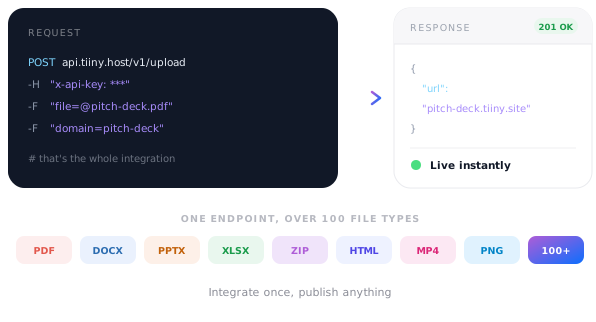
REST API
A Simple API
Upload over 100 different file types using our simple, easy to integrate API. Build automations with ease.
MCP server
MCP optimised across 100+ file types
Easily connect to your favourite editor. Claude Code? It's one command. Cursor? We're in the MCP directory. Connect with VS Code, Windsurf, Zed, Jules, Codex and v0 with a few lines of config. Everything else is easy via mcp-remote.
Claude connector
Claude friendly
Never need to leave Claude. We integrate seamlessly with Claude Web, Desktop & Code to publish websites, prototypes and reports.
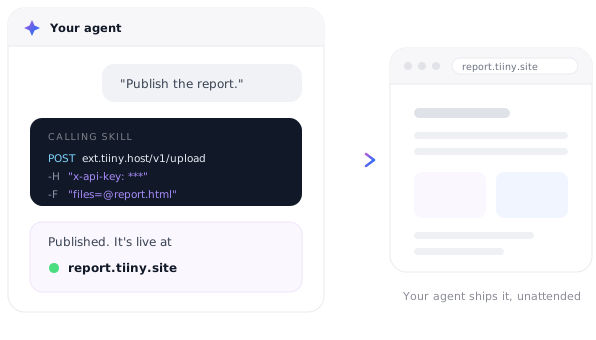
Skill
Skilful
Install our skill to give your agent superpowers. Deploy websites, launch static apps and turn popular files into shareable links instantly.
What agents publish
The output of a conversation, on a URL you can send to someone.
Claude artifactConnector · live in one sentence
Generated reportAPI · published on a schedule
Prototype from CursorMCP · shared for feedback
Build outputAPI · PUT to update in place
Data dashboardAgent-refreshed · same URL
Documentation siteRegenerated on each release
Rave reviews
Shocked by the simplicity of getting it up and running, it took me 2 mins exactly to deploy one of client's websites!

★ ★ ★ ★ ★
KhaledDeveloper, web25.io
I can create a fully branded HTML in 15 minutes on an LLM and have it live within a few seconds.
There's no learning curve. It's so easy — you can do everything with one hand. It's ridiculous.

★ ★ ★ ★ ★
FPFrancois ProvostFreelance developer
Frequently Asked Questions
How does an AI agent publish to Tiiny Host?
It POSTs to the upload endpoint with form-data and an API key header, and gets a live URL back. Updating an existing site is a PUT with the same domain. That's the whole integration, which is why wiring up an agent takes minutes rather than an afternoon.
Do I need an API key to try it?
Not for a first run. An anonymous upload works with just an email header, though it expires after an hour and only works for an address not already linked to an account. Generate an API key when you want the publish to be permanent and to update sites in place.
What is the MCP server address?
https://mcp.tiiny.host. Claude Code adds it with claude mcp add --transport http tiiny-host https://mcp.tiiny.host, Cursor lists it in its MCP tools directory, and any other MCP-capable tool can connect through npx -y mcp-remote https://mcp.tiiny.host.
Does the Claude connector need an API key?
No, not for Claude.ai — the connector authenticates through your Tiiny Host account. Add it under Settings, Connectors, Add custom connector, with the name Tiiny Host and the URL https://mcp.tiiny.host. Tools without in-browser authentication, like Cursor and Jules, use an API key instead.
Which tools are supported?
Claude and Claude Code, Cursor, VS Code, Windsurf, Zed, Jules, Codex and v0 by Vercel all have documented setups. Anything else that supports MCP servers connects with the mcp-remote wrapper.
What can an agent actually publish?
Anything static — plain HTML, a zip, a folder from any framework's build output, single-page apps, or the output of AI tools. A single file gets an auto-viewer and multiple files get a generated directory listing.