Create links for CVs, shortlists, or a job role in seconds using using your agency's custom domain.
Free to start · No credit card
Used by recruiters and talent teams at

One link, three jobs
Simple links for recruitment
The better alternative to PDF attachments & Drive links.
Candidates
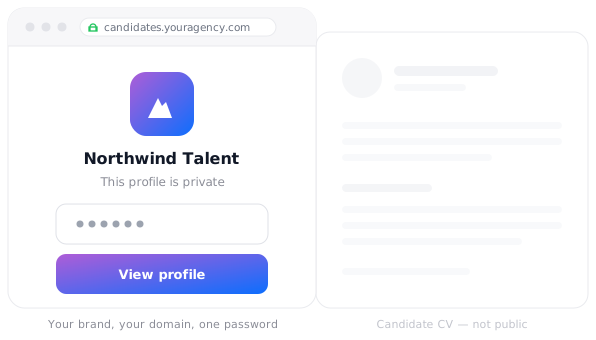
CVs behind your own front door
Protect a candidate profile with one click password protection and customize it with your branding.
Password protect with one-click
Add your logo
No account for hiring managers
Secure every document
Shortlists
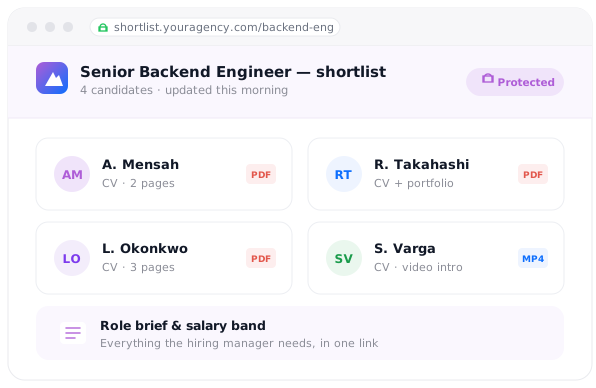
One link for the whole shortlist
Group multiple CVs, the role brief and related documents into a single shareable link. Update it anytime.
Upload multiple document formats
Update anytime
One dashboard for every role
Track views
Roles
Create easy to access job pages
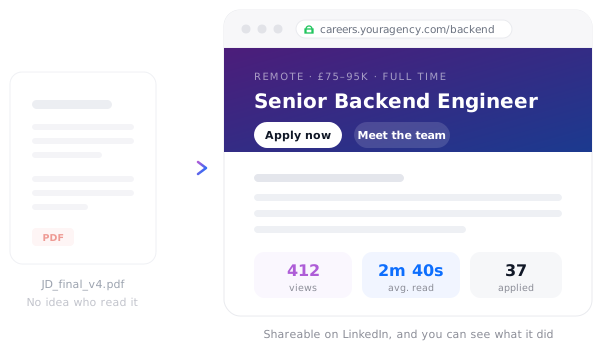
Publish roles as a branded landing page rather than a PDF attachment. Visitors can open it on a phone or a LinkedIn post.
Access with a simple link
Opens on any device
Track views, time spent and referral source

Capture applicant emails
All of it, from one branded link
The files that currently live as attachments in a hiring manager's inbox - sent instead as links.

Candidate profilePDF · password protected
Role shortlistCollection · one link
Job micrositeWeb page · custom domain
Candidate portfolioWeb page · shared with the client
Client pitch deckPDF · tracked link
Salary benchmark reportPDF · email capture
I sent out a proposal via Tiiny today — and the client loved it.
★ ★ ★ ★ ★
HMHailey MatthewsFounder, Spotlight EntertainmentRead the story →
Tiiny worked perfectly for me. I used to host my architectural design portfolio and provided my url on my resume.

★ ★ ★ ★ ★
ZacArchitect
Shocked by the simplicity of getting it up and running, it took me 2 mins exactly to deploy one of client's websites!

★ ★ ★ ★ ★
KhaledDeveloper, web25.io
Frequently Asked Questions
What can I send as one branded link?
Candidates, shortlists and roles all live on the same kind of link. Send a single password-protected CV, group a whole shortlist into one collection, or publish a role as its own page — each one branded like your agency, each one opening in a click with no account for the client, and all managed from one dashboard.
How do I stop a candidate's CV being seen by the wrong people?
Your add setup a password with one-click or only share with specific email addresses. Anyone without access only sees your your branded gate. All uploads and downloads are encrypted with industry-standard TLS/SSL as well.
Can the link carry my agency's branding?
Yes. Connect your own domain and add your logo, so every link you send — a CV, a shortlist or a role — looks like your agency rather than a generic file-sharing screen. For a small agency sending work to a large employer, that first impression does real work.
Do hiring managers need an account to view a candidate?
No. They open the link, enter the password if you've set one, and the profile is there. No sign-up, no portal invitation and no "request access" email sitting unanswered while your candidate takes another offer.
Can I send several candidates as one link?
Yes. Group the CVs, portfolios, video intros and the role brief into a single collection and send that instead of six separate attachments. If the shortlist changes, add or remove a candidate and the link you already sent keeps working and shows the current list.
Will I know whether the client actually looked?
Yes. Analytics show when your link was opened, how long was spent on it and how often someone came back. Use a separate tracked link per client or per role and you can tell exactly which shortlist got attention and which is still sitting unread.
What can I publish as a job microsite?
Anything you can produce as a page — describe the role to Tiiny Create, ChatGPT or Claude and publish the result, or upload something a designer made. It opens straight from a LinkedIn post on a phone, which a PDF attachment does not, and you can capture applicant emails on the page itself.
Can I update a CV or brief after sending it?
Yes. Swap the file and the link stays the same, so the URL already in the hiring manager's inbox shows the new version. That's how you fix a typo on a CV, or add the salary band you forgot, without sending an awkward second email.