The simplest way to share sales proposals

Ditch attachments and share proposals, brochures and decks as a link using your custom domain. Then get notified the instant they open it.

Free to start · No credit card

Used by sales and revenue teams at

Salesforce Airbnb Cushman & Wakefield JLL Nestle Cognizant
Built for today

The modern way to send sales proposals

Google Drive links & PDF attachments don't give you the visibility you need.
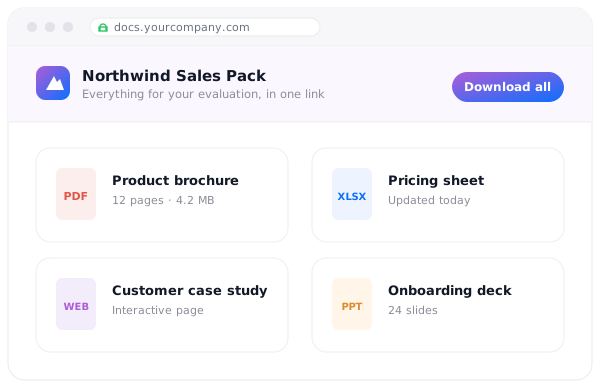
Give prospects a single, branded destination for your brochure, pricing sheet, case study, and deck.
Document collections

Send one, professional link

Group your brochure, pricing sheet, case study and deck into a single document collection and publish it on your custom domain.

  • Connect your domain, add your logo
  • No sign-in for visitors
  • Update anytime, no link changes
  • Supports 100+ file types
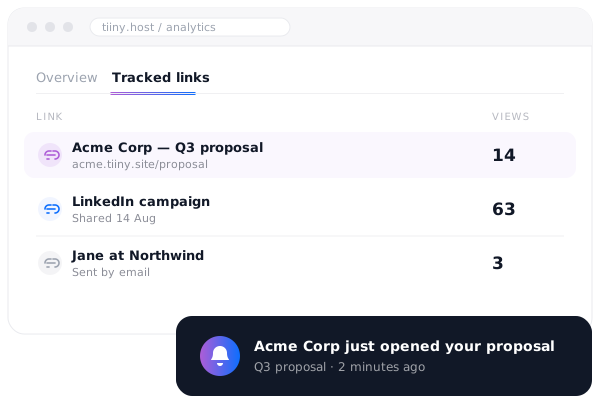
An analytics view listing tracked links with view counts, and a notification that a prospect just opened a proposal
Tracked links

Know when they open it

Create a unique link for each prospect, deal or campaign. Get notified when it's opened to follow up right away.

  • A link per prospect
  • See who opened it
  • Follow up at the right moment
  • Compare channels side by side
Learn more
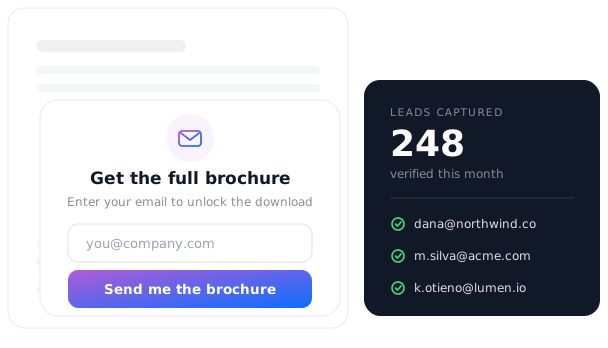
An email capture gate in front of a downloadable asset, next to a list of verified leads collected from it
Email capture

Create lead magnets in seconds

Upload a lead magnet Put your best content behind a one-click email gate. Visitors enter their email to unlock the content, and you receive a verified email for your pipeline.

  • One-click setup
  • Every email verified
  • Export your leads anytime
  • Works on anything you publish
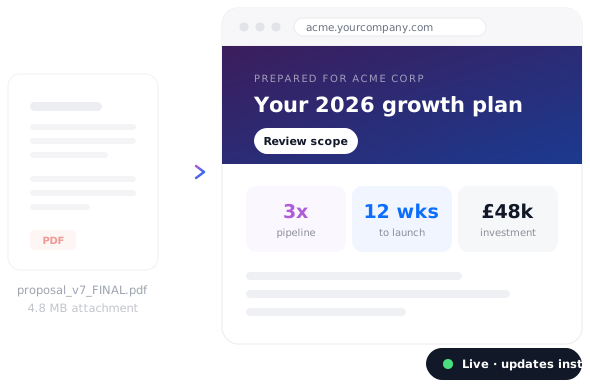
A PDF attachment compared with a live, branded proposal micro-site on its own link
Proposal Websites

Ditch the PDF & impress with a webpage

Send proposals as webpages created with Tiiny Create, Claude, ChatGPT or and LLM. It opens instantly on any any device and you can update it anytime.

  • Build it with AI, publish in seconds
  • Opens instantly on mobile
  • Update whenever
  • Password protect sensitive work
Learn more

What sales teams publish on Tiiny

Every one of these started as a file on someone's desktop and ended up as a link in an inbox.

Client proposal
Client proposal Micro-website · custom domain
Product brochure
Product brochure PDF · tracked link
Pricing & ROI one-pager
Pricing & ROI one-pager PDF · email capture
Deal room
Deal room Collection · password protected
Customer case study
Customer case study Web page · shared on LinkedIn
Campaign landing page
Campaign landing page Web page · tracked per channel
I sent out a proposal via Tiiny today — and the client loved it.
★ ★ ★ ★ ★
Hailey Matthews Founder, Spotlight Entertainment
Read the story →
Shocked by the simplicity of getting it up and running, it took me 2 mins exactly to deploy one of client's websites!

★ ★ ★ ★ ★
Khaled Khaled Developer, web25.io
I've been in the marketing world for quite a long time, and I have an agency and all the things. This is what I've been looking for.

★ ★ ★ ★ ★
Jordan Lynae Founder, marketing agency

Frequently Asked Questions

How do I know when a prospect has opened my proposal?

Share your proposal as a tracked link rather than an attachment. Tiiny Host tells you when that link is opened, how often it's been viewed and when someone comes back for a second look — so you can follow up at the moment interest is highest, instead of sending a "just checking in" email a week too late.

Can I tell which person or channel a view came from?

Yes. Create a separate tracked link for each person, campaign or channel — one for the buyer, one for LinkedIn, one for the follow-up email — and give each a name. The Tracked links tab in Analytics shows every link you've created alongside its visit count, so you can see exactly which channel is driving interest. Tracked links are available on the Solo plan and above.

Do my prospects need an account to open what I send?

No. Anything you publish opens straight in the browser on any device. There's no sign-up, no app to install and no "request access" email sitting in your inbox — the friction that costs you replies simply isn't there.

Can I send proposals from my own domain?

Yes. Connect your own custom domain and add your logo, and every link you send arrives branded as yours rather than as a generic file-sharing URL. It's a small thing that makes a two-person team look like an established one.

Can I capture email addresses before someone downloads a document?

Yes. Turn on email capture and visitors enter their address before the download unlocks. Tiiny Host verifies each address before releasing the file, so the leads that reach your pipeline are real ones rather than typos and throwaways.

Is this secure enough for commercial documents?

All uploads and downloads are encrypted with industry-standard TLS/SSL, and you can add one-click password protection to any file, page or collection. For a deal room or anything commercially sensitive, set a password and share it separately from the link.

What can I actually send?

Over 100 file types — proposals as PDF or DOCX, decks as PPT or KEY, spreadsheets, images, video and full HTML pages. Individual files can be up to 5TB, so a video walkthrough or a heavy design pack is no problem.

Send your next proposal as a link