Host a bolt.new Export

Download your Bolt project and put it live on a link you control

⭐️ 2,000,000+ happy users
Free to start · No credit card · Trusted by teams at Salesforce, Airbnb, JLL, Nestlé

Take your Bolt project anywhere

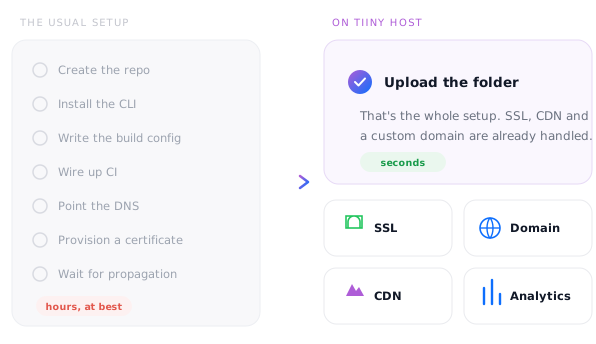
bolt.new builds and runs full apps right in your browser, and it can publish them to a bolt.host address. When you want the site to live independently of the builder, keep all your AI projects in one dashboard, or add password protection and feedback comments, move it to Tiiny Host. Download the project, run the build once on your computer and upload the dist folder. After that, publishing a new version is a single drag and drop.
Take your Bolt project anywhere

Host your Bolt app in 3 steps

1. Drop in your build

1. Drop in your build

In Bolt choose Export > Download, run npm run build on the project, then drag the zipped dist folder onto Tiiny Host.

2. Choose a link name

2. Choose a link name

Keep your app's name, or go for something shorter to share.

3. Go live

3. Go live

Your Bolt app is online on its own link, independent of the builder.

Features

What your Bolt app gets on Tiiny Host

⚡ Vite builds, ready to go

Many Bolt projects use Vite, which builds to static files that run on Tiiny Host unchanged.

📦 Zip in, site out

Upload the built dist folder as a zip. No build settings or deploy config to fill in.

🌐 A domain of your own

Swap the bolt.host address for yourname.tiiny.site, or your own domain on Solo and above.

🔒 Password protect

Keep a client build or beta behind a password until it's ready (Solo and above).

💬 Feedback mode

From the Tiny plan, testers pin comments on the live app without creating an account.

📊 Analytics

Visits, traffic sources and devices on every paid plan, switched on automatically.

Compared

Keep it on bolt.host, or give it its own home?

Bolt's own hosting is the quickest way to share while you build. Tiiny Host gives the finished front end somewhere to live that doesn't depend on the builder.

⚡ Tiiny Host
Builder hosting
Separate from your builder
Your site stays up whichever builder you use next.
✓ Yes
Tied to the builder
Every AI project in one place
Host Bolt, Lovable, v0, Claude and Cursor projects side by side in one dashboard.
✓ Yes
One builder only
Password protection
Lock any site with a password on Solo and above.
✓ Yes
Limited
Comments without an account
Feedback mode lets testers pin comments on the live app, with no sign-up.
✓ Yes
Rarely
Built-in QR codes
Every site gets a QR code on paid plans, and it keeps working when you update it.
✓ Yes
Separate tool
Capture emails before viewing
Ask visitors for an email address before they can see the page, on Pro.
✓ Yes
Not included
Also works with Lovablev0ReplitClaudeCursorChatGPT
Pricing

Your first Bolt app is free to host

One app stays online on the free plan for as long as you log in once every three months. Upgrade when you need more space, more apps or your own domain.

Free
$0/mo, forever
  • ✓ 1 live site
  • ✓ HTML and zip uploads up to 3 MB
  • ✓ 5,000 visits and 5 GB bandwidth a month
  • ✓ Free yourname.tiiny.site address with SSL
  • ✓ Create with AI built in
  • – Shows a small Tiiny Host banner
Upgrade when you need more
from $5/mo, billed yearly
  • Tiny $5 · no banner, 25 MB uploads, analytics, QR codes, feedback mode
  • Solo $13 · 5 sites, unlimited uploads, custom domains, password protection, code and visual editors, API
  • Pro $31 · 15 sites, email capture, team members, priority support
  • Pro Max $74 · unlimited sites, 2 TB of storage
See all plans → ⭐️ 7-day money-back guarantee

How big can my app be?

Per-file upload limit by plan
Free
3 MB
HTML, zip and other files
Tiny · $5
25 MB
per project
Solo · $13
75 MB
per project
Pro · $31
10 GB
account limit
Pro Max · $74
2 TB
account limit

Upload the dist folder, not the whole download: the source and node_modules are far bigger than the finished app. A built Bolt app is usually small before images, while games with sprites and sound often need Tiny's 25 MB or more.

Agent friendly

Publish every build automatically

Keep building in Bolt and let a script handle hosting. Send the zipped dist folder to the upload endpoint and a live link comes back. PUT to the same domain to update it without changing the link.

REST APISimple upload endpoint. Build automations and scheduled publishing.
MCP serverClaude Code in one command. Cursor, VS Code, Windsurf, Zed, Codex, v0 with a few lines of config.
Claude connectorPublish reports and documents straight from Claude Web, Desktop and Code.
SkillInstall once and your agent can turn any file into a shareable link.
Read the API docs → API access on Solo and above
upload.sh
curl -X POST https://ext.tiiny.host/v1/upload \
  -H "x-api-key: $TIINY_API_KEY" \
  -F "files=@dist.zip" \
  -F "domain=my-bolt-app.tiiny.site"

# → https://my-bolt-app.tiiny.site
# PUT the same domain to replace it
Use cases

Bolt projects that suit static hosting

MVPs

MVPs

Put your first version in front of real users on your own domain.

Landing pages

Landing pages

Launch and waitlist pages that load fast from static files.

Client prototypes

Client prototypes

Password-protected previews clients can click through and comment on.

Browser games

Browser games

Games you built in Bolt, playable by anyone from a single link.

Internal tools

Internal tools

Calculators, checklists and small team tools that run in the browser.

Dashboards

Dashboards

Data views that read from your hosted back end, shared on a stable link.

Resources

Learn more about publishing Bolt apps

How to Build & Publish an App in 5 Minutes With Bolt

Our help centre guide to exporting a Bolt project and publishing it on Tiiny Host.

7 Best AI Landing Page Builders in 2026 (+ How to Publish in Seconds)

Where Bolt sits among AI page builders, and how to get each one's output online.

How To Deploy a React App

Build and upload steps for React projects, which covers most Bolt apps too.

Frequently Asked Questions

How do I host a bolt.new project on Tiiny Host?

In Bolt, click the project name at the top left and choose Export, then Download. Unzip the project on your computer, run npm install and npm run build, and zip the contents of the dist folder that's created. Upload that zip to Tiiny Host, choose a link name and click launch.

Can I upload the Bolt download as it is?

Only if it's plain HTML. The download is a copy of your project's source files, not a finished site, so framework projects need building once on your computer before a browser can run them. If there's no package.json and index.html sits at the top level, you can upload the zip straight away.

What if my Bolt app uses a database or server functions?

The front end will host fine; the server side won't come with it. Tiiny Host serves static files, so anything that needs a server at runtime, such as Bolt Cloud's database or server functions, can't run here. Apps that call Supabase or another hosted back end from the browser usually keep working, as long as you add your new address to the back end's allowed redirect URLs. On the free plan, pages with a password field, like a sign-in form, are held as a one-hour preview for a manual check; paid plans publish them permanently.

Why is my Bolt app blank once it's online?

Check that you uploaded the dist folder rather than the source code, and that index.html is at the top level of the zip. If the page loads without styles or scripts, set base: './' in vite.config, rebuild and upload again.

Can I host a Bolt project that isn't React?

Yes. Whether Bolt used Vue, Svelte, Astro or plain HTML, the steps are the same: build it, then upload the output folder. Frameworks that need a Node.js server while running, such as a Next.js app with server features, need a static export first.

How do I update the site after more changes in Bolt?

Download the project again, rebuild it and upload the new dist folder over the old one. The link stays the same, so anyone you've already shared it with sees the latest version. The free and Tiny plans allow three uploads a day, updates included.

Can I move from bolt.host to my own domain?

Yes. Host the build on Tiiny Host, then connect your domain on Solo or above, or buy one through Tiiny Host. SSL is included. Once the new address works, you can point people to it and stop using the bolt.host link.

How much does it cost to host a Bolt app?

Nothing for one small app: the free plan covers a single site up to 3 MB with 5,000 visits a month and a small Tiiny Host banner. Games and image-heavy apps often need more than 3 MB, so Tiny's 25 MB, from $5 a month billed yearly, is the usual next step.

Put your Bolt app online