HTML File Hosting

Host your HTML file online for free, on a link you name yourself

Zip
File
Drag & drop zip or
single file here
Upload file
This site is protected by reCAPTCHA and the Google Privacy Policy and Terms of Service apply.
⭐️ 2,000,000+ happy users
Free for one page or site · Trusted by teams at Salesforce, Airbnb, JLL, Nestlé

HTML to website in one upload

Tiiny Host is an HTML uploader that turns an .html file into a website with its own address, served over HTTPS at a tiiny.site name you pick. It handles a page you coded by hand the same way as HTML an AI assistant wrote for you. The HTML viewer is there if you'd like to see how a file renders before publishing.

HTML to website in one upload

How to upload an HTML file to a website for free

The same steps work for a one-page file or a full site

1. Add your HTML file

1. Add your HTML file

Drop the .html file onto the upload box above. A site with CSS or images goes up as one zip.
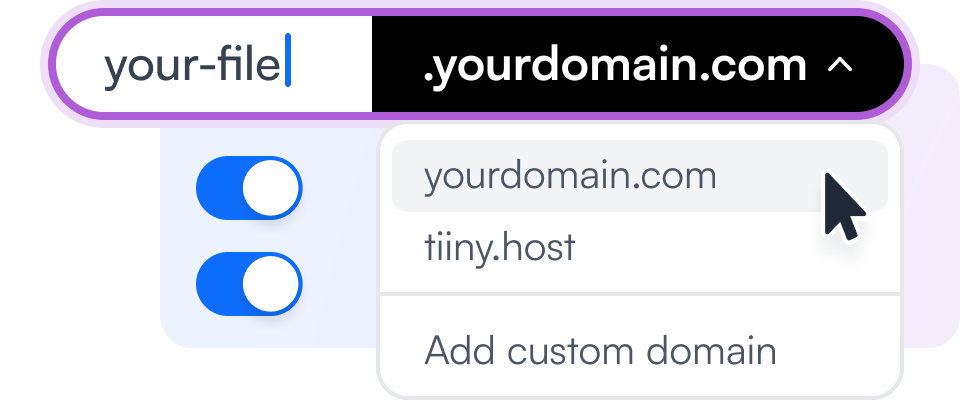
2. Choose a link name

2. Choose a link name

The name becomes the address, such as my-page.tiiny.site, so pick something people will recognize.

3. Verify your email and go live

3. Verify your email and go live

The first time you publish, Tiiny Host emails you a short code to confirm your address. After that the page is live over HTTPS and the link is yours to share.

Video

Here's how you can host your HTML and CSS website

Features

What the HTML uploader includes

🤑 Free to use

Going from HTML to website costs nothing for your first site, and the free plan has no time limit.

📋 Paste HTML

The Paste HTML editor in your dashboard publishes code you paste or type, with an optional page title and code for the head section, such as an analytics tag.

👨‍🔧️ Reliable

Hosted on Amazon Web Services infrastructure designed for 99.99% availability.

🌐 Custom Domain

On Solo, the page can use your own domain, so a client sees your brand in the address bar.

✏️ Edit Online

The online code editor saves changes straight to the published page, which is handy for a quick typo fix. Available on Solo.

🔒 Password Protect

A password screen keeps drafts and client work away from anyone who hasn't been given the password.

Compared

Convert HTML to a URL online for free: Tiiny Host vs the usual options

Wix and Squarespace expect code to go into a block inside their editor, so a finished .html file doesn't slot in as a page of its own. Netlify and GitHub Pages will serve one, through a repository or a drag-and-drop uploader.

⚡ Tiiny Host
Builders and Git hosts
Upload the file as it is
A single .html file uploads on its own. If it links to stylesheets or images, zip them together first.
✓ Yes
Repo or code block
Your markup is left alone
The page is served exactly as you wrote it, with no builder template wrapped around it.
✓ Yes
Builder templates
Online in seconds
Once you've chosen a link name, the page goes live at yourname.tiiny.site over HTTPS.
✓ Yes
Varies
Same address after edits
Uploading a new version replaces the page without changing its link or QR code.
✓ Yes
Varies
Browser code editor
Solo and higher plans can edit the HTML online, so small fixes don't need a re-upload.
✓ Yes
Varies
Visitor analytics
From the Tiny plan up, you can see how many people opened the page and where they came from.
✓ Yes
Add a script
Password protection
Solo plans and above can put the page behind a password.
✓ Yes
Paid tiers
Easier to host than WixSquarespaceGoogle Cloud Website HostingNetlify Website HostingGitHub Website Hosting See the static hosting comparison →
Pricing

Host an HTML file online for free

Free HTML file hosting is a comfortable fit for a single file, and it stays online indefinitely as long as you log in every three months.

Free
$0/mo, forever
  • ✓ 1 live page or site
  • ✓ Files up to 3 MB
  • ✓ 5,000 visits and 5 GB bandwidth a month
  • ✓ Free tiiny.site address with SSL
  • – Free pages show the Tiiny Host banner
Upgrade when you need more
from $5/mo, billed yearly
  • Tiny $5 · banner removed, 25 MB uploads, visitor stats, version history
  • Solo $13 · 5 sites, your own domain, online code editor, password protection, API
  • Pro $31 · 15 sites, visitor email capture, team members, priority support
  • Pro Max $74 · unlimited sites, 2 TB of storage
See all plans → ⭐️ 7-day money-back guarantee

Size limits by plan

Per-file upload limit by plan
Free
3 MB
per page or site
Tiny · $5
25 MB
per project
Solo · $13
75 MB
per project
Pro · $31
10 GB
account limit
Pro Max · $74
2 TB
account limit

Most HTML files are measured in kilobytes, so the 3 MB free limit only comes into play once a zipped site brings large images or video along.

Agent friendly

Publish HTML from your scripts and AI tools

AI assistants produce HTML files constantly. With an API key, a script or agent can post the file to the upload endpoint and receive the live URL in the response. Replacing the page later takes a PUT request for the same domain.

REST APISimple upload endpoint. Build automations and scheduled publishing.
MCP serverClaude Code in one command. Cursor, VS Code, Windsurf, Zed, Codex, v0 with a few lines of config.
Claude connectorPublish reports and documents straight from Claude Web, Desktop and Code.
SkillInstall once and your agent can turn any file into a shareable link.
Read the API docs → API access on Solo and above
upload.sh
curl -X POST https://ext.tiiny.host/v1/upload \
  -H "x-api-key: $TIINY_API_KEY" \
  -F "files=@index.html" \
  -F "domain=my-html-page.tiiny.site"

# → https://my-html-page.tiiny.site
# PUT the same domain to replace it
Examples

Typical uses for a hosted HTML file

Testing

Testing

Checking a page on a real web server, where relative paths and HTTPS behave as they will in production.

Prototyping

Prototyping

Sending a clickable prototype to a client who doesn't want to download anything.

Embedded content

Embedded content

Pages built around an embed, such as a YouTube video or a booking widget, which needs a real URL to load properly.

Resources

Learn more about hosting HTML

How to Upload an HTML File to a Website

Covers single files and zipped folders, plus editing a page in the browser after it goes live.

Web Hosting Guide: A Complete Beginner's Guide

Explains how web hosting works and covers shared, VPS, cloud and dedicated hosting.

How To Host Your Website in 30 Seconds

Two steps for putting a downloaded website template online.

Frequently Asked Questions

How to host an HTML page for free?

Drop the file into the box on this page and give it a link name. Publishing asks you to confirm your email once, and from then on the page has its own web address. Free accounts get one live project of up to 3 MB, with room for 5,000 visits a month. A small Tiiny Host banner appears on free pages until you upgrade.

Do I need to upload my CSS and JavaScript files too?

Only if the page loads them as separate files. In that case they go into one folder with the main page named index.html, and you upload the folder as a zip. A self-contained HTML file can go up on its own.

Can I publish HTML code without saving it as a file?

Yes. The Paste HTML tab in your dashboard opens an editor where you can paste or write code, and it publishes like any upload.

How to host an HTML page temporarily?

Publish it as usual and share the link while you need it. When the demo or review is over, delete the project from your dashboard: the bin icon in the three-dot menu under Actions removes the files and the link together. A deletion on the free plan can't be undone, so keep your own copy. Paid plans can archive a project, which takes it offline without deleting it.

Can I edit my HTML after it's online?

On Solo and higher there's an online code editor that saves to the same link. Any plan can also upload a replacement file, which keeps the address unchanged.

How long will my HTML file stay online?

There's no expiry date. On the free plan, logging in once every three months keeps your account and its page active.

Can I use my own domain for my HTML page?

Custom domains come with Solo and every plan above it, SSL included. Domains you already own can be connected, or you can buy a new one from your dashboard.

Publish your HTML website for free