Codex Hosting

Give Codex somewhere to publish, so every build comes back as a live link

⭐️ 2,000,000+ happy users
Free to start · No credit card · Trusted by teams at Salesforce, Airbnb, JLL, Nestlé

Hosting your agent can use

Codex can plan, write and test a whole site on its own, then it stops at the last step: putting it online. Tiiny Host is hosting Codex can use directly. Connect our MCP server once and Codex can publish a build to a live URL, update it in place and hand you the link when the task is done. There are no deploy scripts or hosting dashboards to set up, and it works on every plan, including free.
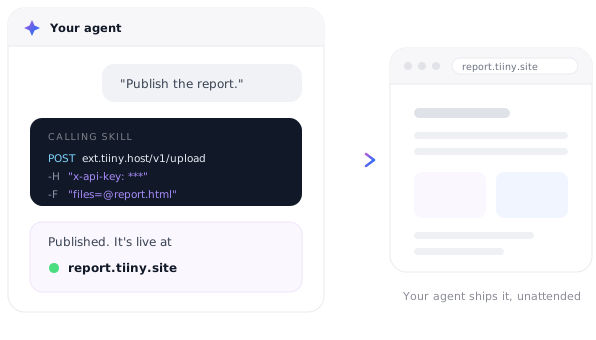
Hosting your agent can use

From Codex build to live link

Do it yourself, or let Codex do all three

1. Drop in the build

1. Drop in the build

Drag Codex's build output onto Tiiny Host, or connect the MCP server and Codex uploads it for you.

2. Name the link

2. Name the link

Pick the name yourself, or tell Codex which name to use.

3. Launch

3. Launch

The site goes live and Codex replies with the link.

Features

Made for agent publishing

🔌 Two-command setup

Add the server with codex mcp add, sign in with codex mcp login, and Codex is ready to publish.

🔗 A live link every task

Ask Codex to publish when it finishes and the link comes back in the same reply.

🔄 Updates in place

Codex can update an existing site, so the URL you shared keeps working after every change.

🧩 Set up once

The Codex app, CLI and IDE extension share one configuration, so the connection follows you.

🔒 Private previews

Password protect work-in-progress sites from your dashboard on Solo and above.

💬 Human feedback

From the Tiny plan, reviewers pin comments on the live page, so you can pass their notes straight back to Codex.

Compared

Why Codex publishes to Tiiny Host

Most hosts were designed for people clicking through a dashboard or wiring up CI. Tiiny Host is simple enough for an agent to use in one step.

⚡ Tiiny Host
Traditional hosts
Quick MCP setup
Two commands: add the server, then sign in with your Tiiny Host account. No tokens to paste into Codex.
✓ Yes
CLI and API tokens
Works on the free plan
The MCP server is included on every plan, so you can try agent publishing at no cost.
✓ Yes
Varies
Same URL after updates
Codex updates the existing site in place instead of creating a fresh preview address for each deploy.
✓ Yes
Often a new URL
No repo or build pipeline
Codex uploads the build output directly. There's nothing to connect first.
✓ Yes
Repo and CI
Previews anyone can comment on
Feedback mode lets non-developers leave notes on the live page without an account.
✓ Yes
Login required
Password protection from $13/mo
Keep agent-published previews private on Solo and above.
✓ Yes
Often paid extra
The same MCP server works with Claude CodeCursorVS CodeWindsurfZedJulesv0
Pricing

Start free. Scale when Codex does.

The MCP server is included on every plan. Start on the free plan and upgrade when you need more sites, bigger uploads, unlimited daily updates or your own domain.

Free
$0/mo, forever
  • ✓ 1 live site
  • ✓ HTML and zip uploads up to 3 MB
  • ✓ 5,000 visits and 5 GB bandwidth a month
  • ✓ Free yourname.tiiny.site address with SSL
  • ✓ Codex publishing over MCP
  • – Shows a small Tiiny Host banner
Upgrade when you need more
from $5/mo, billed yearly
  • Tiny $5 · no banner, 25 MB uploads, analytics, QR codes, feedback mode
  • Solo $13 · 5 sites, unlimited uploads, custom domains, password protection, code and visual editors, API
  • Pro $31 · 15 sites, email capture, team members, priority support
  • Pro Max $74 · unlimited sites, 2 TB of storage
See all plans → ⭐️ 7-day money-back guarantee

How big can my site be?

Per-file upload limit by plan
Free
3 MB
HTML, zip and other files
Tiny · $5
25 MB
per project
Solo · $13
75 MB
per project
Pro · $31
10 GB
account limit
Pro Max · $74
2 TB
account limit

Agents iterate fast, so watch the daily limit as well as size: the free and Tiny plans allow three uploads a day, updates included, while Solo and above are unlimited. Most built front ends are a few hundred KB to a few MB.

Agent friendly

Prefer scripts? Use the REST API

Put publishing in a build step or a Codex skill. One POST with the output and an API key returns a live link, and a PUT to the same domain replaces it. API keys come with Solo and above; the MCP server is on every plan.

REST APISimple upload endpoint. Build automations and scheduled publishing.
MCP serverClaude Code in one command. Cursor, VS Code, Windsurf, Zed, Codex, v0 with a few lines of config.
Claude connectorPublish reports and documents straight from Claude Web, Desktop and Code.
SkillInstall once and your agent can turn any file into a shareable link.
Read the API docs → API access on Solo and above
upload.sh
curl -X POST https://ext.tiiny.host/v1/upload \
  -H "x-api-key: $TIINY_API_KEY" \
  -F "files=@dist.zip" \
  -F "domain=codex-preview.tiiny.site"

# → https://codex-preview.tiiny.site
# PUT the same domain to replace it
Use cases

What Codex can publish for you

A preview for every task

A preview for every task

Have Codex publish each branch or task so reviewers can click a link instead of pulling code.

Prototypes

Prototypes

Spin up several versions of an idea and send all the links at once.

Internal tools

Internal tools

Small tools for your team, published and updated by Codex as the requirements change.

Reports & dashboards

Reports & dashboards

Codex regenerates a dashboard from fresh data and updates it at the same URL.
Docs sites

Docs sites

Documentation rebuilt and republished whenever it changes.

Landing pages

Landing pages

Marketing pages Codex drafts, publishes and revises while you review.

Resources

Learn more about AI agents and hosting

Top AI Hosting Platforms in 2026

A comparison of the places AI-built sites can be hosted, and the trade-offs of each.

7 Helpful AI Coding Tools to Make Your Development Journey Easy

A tour of AI coding tools and where each fits in a development workflow.

Building with AI

Guides and ideas for building sites and tools with AI, from first prompt to published link.

Frequently Asked Questions

What is Codex hosting?

Codex hosting means giving OpenAI's coding agent somewhere to put what it builds. Codex can write, run and test code, but it doesn't host websites. With the Tiiny Host MCP server connected, Codex can publish a finished build to a live URL and update it later, all from the same session.

How do I connect Tiiny Host to Codex?

Run codex mcp add tiiny-host --url https://mcp.tiiny.host in your terminal, then run codex mcp login tiiny-host to sign in to your Tiiny Host account. The Codex app, CLI and IDE extension share the same configuration, so you only do this once. If Codex says remote MCP servers aren't enabled, add the setting shown in our MCP connection guide to ~/.codex/config.toml and try again.

Do I need an API key?

Not for the MCP server. Codex signs in through your Tiiny Host account when you run codex mcp login. API keys are for scripts and tools that can't sign in through a browser, and they're available on Solo plans and above.

What can Codex publish?

Anything static: a single HTML file, a zip, or the build folder from React, Vue, Svelte, Astro or a static Next.js export, plus PDFs and more than 100 other file types. Code that needs a server while it runs, like API routes or a database, won't run on static hosting.

Can I make Codex publish automatically?

Yes. Add an instruction to your project's AGENTS.md, for example: "When a task changes the site, build it, publish it with Tiiny Host and reply with the link." Codex reads AGENTS.md when it starts work, so it follows the instruction without you repeating it.

Will the link change when Codex updates the site?

No. When Codex updates an existing project, the files are replaced and the URL stays the same. Anyone you've already sent the link to sees the latest version, and on Tiny and above, version history lets you roll back an update you don't like.

Can my team review what Codex published?

Yes. On Tiny and above, turn on feedback mode and anyone with the link can pin comments on the live page without signing up. Copy their notes into your next Codex prompt and ask it to update the same site.

Is Codex hosting free?

Yes, to start. The MCP server works on the free plan, which hosts one site up to 3 MB with 5,000 visits a month and three uploads a day. Paid plans start at $5 a month billed yearly, and Solo adds five sites, unlimited uploads, custom domains, password protection and API access.

Can I still upload a Codex build by hand?

Of course. It's the same hosting either way. Build the project, zip the output folder and drag it onto Tiiny Host. Connecting the MCP server just lets Codex do that step for you.

Give Codex a place to publish