Cursor Hosting
Publish the apps and sites you build in Cursor, by hand or straight from the agent
Where Cursor projects go live
Cursor is where you write the code, with an agent that can build whole features for you. It isn't a host, so every project eventually hits the same question: where does this go live? Tiiny Host is the shortest answer. Drag your build folder onto Tiiny Host, or add our MCP server from Cursor's MCP directory and ask the agent to publish. The link keeps working after you close your laptop, which a localhost tunnel can't promise.
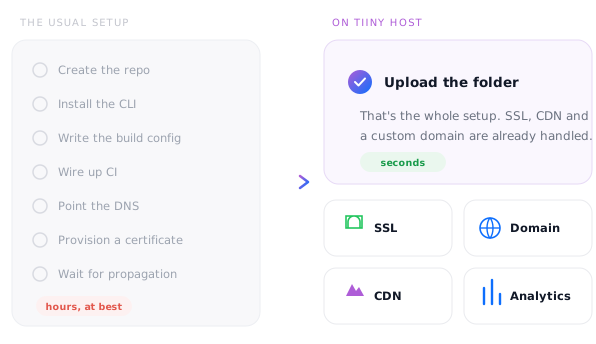
Host your Cursor project in 3 steps

1. Drop in your build
Run npm run build in Cursor's terminal, zip the output folder so index.html is at the top level, and drag it onto Tiiny Host.

2. Name your link
Use the project name, or connect a domain if this one's here to stay.

3. Click launch
Your project is live. Next time, skip all three steps and ask Cursor's agent to publish it.
From editor to URL, minus the setup
🧭 In Cursor's MCP directory
Search for Tiiny Host in Cursor's MCP directory and add it in a couple of clicks.
🤖 Agent publishing
Ask Cursor's agent to publish the build and it replies with the live link.
📦 Any static build
React, Vue, Svelte, Astro, Angular, plain HTML or a static Next.js export.
🔄 Same link, every update
Republish over the existing site and the URL stays exactly the same.
🔒 Password protect
Share side projects and client work privately until you're ready to launch (Solo and above).
💬 Feedback mode
From the Tiny plan, reviewers pin comments on the live page with no GitHub or Cursor account.
Sharing localhost vs a hosted link
Screen shares and tunnels to npm run dev work for a quick look. When someone needs to open your project on their own time, a hosted link is easier on everyone.
Free for side projects
Keep one project online free for as long as you log in once every three months. Solo adds five projects, unlimited daily uploads and custom domains for when you're shipping more often.
- ✓ 1 live site
- ✓ HTML and zip uploads up to 3 MB
- ✓ 5,000 visits and 5 GB bandwidth a month
- ✓ Free yourname.tiiny.site address with SSL
- ✓ Publish from Cursor over MCP
- – Shows a small Tiiny Host banner
- Tiny $5 · no banner, 25 MB uploads, analytics, QR codes, feedback mode
- Solo $13 · 5 sites, unlimited uploads, custom domains, password protection, code and visual editors, API
- Pro $31 · 15 sites, email capture, team members, priority support
- Pro Max $74 · unlimited sites, 2 TB of storage
How big can my site be?
Per-file upload limit by planCheck the size of the build folder, not the project: node_modules never gets uploaded. A built front end is usually a few hundred KB to a few MB, so small projects fit the free plan and most others fit Tiny or Solo.
Let Cursor's agent publish for you
Add Tiiny Host from Cursor's MCP directory, or add a server with the URL https://mcp.tiiny.host in Cursor's MCP settings, and the agent can publish and update your sites. For CI or scripts, one POST to the upload endpoint returns a live link.
curl -X POST https://ext.tiiny.host/v1/upload \
  -H "x-api-key: $TIINY_API_KEY" \
  -F "files=@dist.zip" \
  -F "domain=my-cursor-app.tiiny.site"

# → https://my-cursor-app.tiiny.site
# PUT the same domain to replace itCursor projects to put online

Prototypes
Share a working prototype the same afternoon you build it, and collect comments on the page.
Side projects
Weekend builds that deserve a real URL, not a localhost screenshot.

Portfolios
Your developer or design portfolio, on your own domain.

Internal tools
Small tools for your team, behind a password and easy to update.

Dashboards
Data visualisations and reporting front ends, shared as a link.

Games
Browser games and creative coding experiments, playable by anyone.
How to Build & Publish an App With Cursor AI (Beginner Guide)
A beginner-friendly walkthrough of building an app in Cursor and publishing it.
How to Build & Publish an App in 5 Minutes With Cursor AI
Our help centre guide to finding your build output and publishing it on Tiiny Host.
7 Helpful AI Coding Tools to Make Your Development Journey Easy
How Cursor compares with other AI coding tools, and what each is best at.



