

- Summary
- GitHub alternatives at a glance
- Key takeaways
- Why developers look for a GitHub alternative in 2026
- Moving a GitHub Pages website
- Hosted code platforms closest to GitHub
- Self-hosted GitHub alternatives
- A GitHub alternative for email-based development
- If you rely on GitHub Actions
- Hosted vs self-hosted vs nonprofit: what you give up
- Best GitHub alternative by situation
- Switching from GitHub: a quick checklist
- What is the best GitHub alternative?
- FAQs: GitHub alternatives
- GitHub alternatives: related guides
- Final verdict
The best GitHub alternative in 2026 depends on the job GitHub does for you: GitLab is the closest all-in-one replacement, with code and CI/CD in one product, Codeberg is a nonprofit home for open-source projects, Bitbucket fits teams already on Jira, Forgejo and Gitea run on your own server, and SourceHut suits email-based workflows.
If you mostly used GitHub Pages to publish a website or share an HTML project, Tiiny Host publishes it from a zip file, with no Git repository needed.
Tiiny Host is my company, and because it isn’t a Git host, I’ve ranked it first only for the GitHub Pages job and pointed to the code platforms for everything else.
I’ve taken each platform’s facts from its own site and documentation, and I didn’t migrate a test project to any of them.
All prices below are US dollar list prices without tax, checked on the date given in the note at the bottom.
Summary
- Best for publishing a website without Git: Tiiny Host, turning a zip of your site into a link, or deploying from GitHub on every plan.
- Best all-in-one GitHub alternative: GitLab, with code and CI/CD in one product, plus GitLab Pages and an importer for GitHub projects.
- Best for open-source projects: Codeberg, a free service run by the nonprofit Codeberg e.V. in Berlin.
- Best for teams on Jira: Bitbucket, free for up to 5 users and connected to Jira work items.
- Best self-hosted forge: Forgejo, guaranteed free software with built-in Forgejo Actions.
- Best self-hosted option with paid support: Gitea, free under the MIT license, with Gitea Cloud and Gitea Enterprise for teams.
- Best for email-based development: SourceHut, an open-source forge priced at what you can afford.
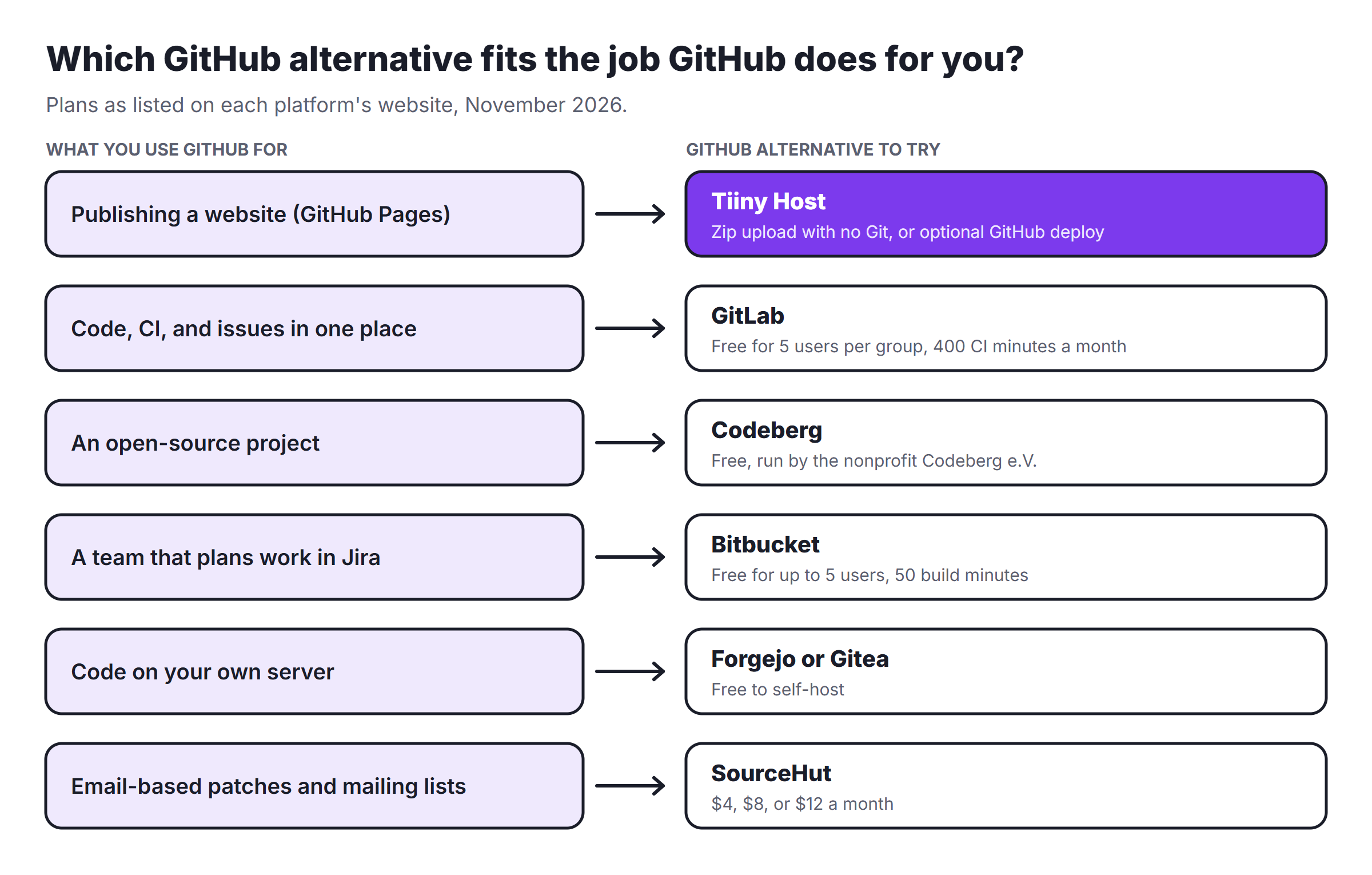
Each GitHub job matched to a platform, using plans the platforms publish themselves.
GitHub alternatives at a glance
| Platform | Free option | Paid price | Best for |
|---|---|---|---|
| Tiiny Host | 1 project up to 3 MB | Tiny from $5 a month billed yearly, or $9 monthly | Publishing websites without Git |
| GitLab | 5 users per group, 400 compute minutes, 10 GiB storage | Premium $29 per user a month, billed yearly | All-in-one code and CI |
| Codeberg | Free, funded by donations | No paid plan | Open-source projects |
| Bitbucket | Up to 5 users, 50 build minutes | Standard $3.65, Premium $8 per user a month | Teams on Jira |
| Forgejo | Free software you host yourself | Your own server costs | Self-hosting |
| Gitea | Free under the MIT license, self-hosted | Enterprise listed at $19 per user a month on a 1-year plan | Self-hosting with support |
| SourceHut | Contributors need no payment | $4, $8, or $12 a month, by what you can afford | Email-based workflows |
| GitHub (for reference) | Unlimited repositories, 2,000 CI/CD minutes | Team $4, Enterprise $21 per user a month | Most open-source and company projects |
Key takeaways
- GitHub’s free plan is generous: unlimited public and private repositories and 2,000 CI/CD minutes a month mean a move should fix a specific problem.
- CI is the hardest part to move: Gitea keeps the GitHub Actions workflow format, and every other platform here uses its own CI format or runs CI on request.
- Open-source projects have a nonprofit option: Codeberg is free, though its private storage is a small allowance meant for free-software contributors.
- Teams have two familiar choices: GitLab for an all-in-one platform, with an importer for whole GitHub projects, and Bitbucket for Jira-based teams.
- Self-hosting means owning the server: Forgejo and Gitea are free to run, and the cost moves to your own infrastructure and time.
- GitHub Pages is a separate decision: publishing a website doesn’t need a Git host, and Tiiny Host publishes from a zip.
Why developers look for a GitHub alternative in 2026
Developers in 2026 leave GitHub for a handful of concrete reasons, most of them about CI or ownership:
- GitHub Actions reliability: the Zig programming language moved its main repository to Codeberg on November 26, 2025, and its announcement cites problems with GitHub Actions scheduling as a main reason.
- Ownership and AI features: some open-source maintainers prefer a forge run by a nonprofit or by themselves, away from a single company’s AI and product priorities.
- Data location: some teams in Europe prefer code on European servers, and Codeberg’s Berlin hardware or a self-hosted Forgejo or Gitea server can provide that.
- GitHub Pages rules: GitHub’s documentation says GitHub Pages isn’t meant for running an online business, an ecommerce site, or SaaS, and published sites are capped at 1 GB with a soft bandwidth limit of 100 GB a month.
If none of those apply, GitHub’s free plan, with unlimited repositories and 2,000 CI/CD minutes a month according to GitHub’s pricing, is hard to replace, and I’d normally stay.
Moving a GitHub Pages website
GitHub Pages is the part of GitHub that puts a website or an HTML project online.
A Pages site can move to a new home without your code moving at all.
1. Tiiny Host: best for sharing sites without Git
Tiiny Host takes the finished files of a website, as a zip or a single HTML file, and turns them into a live link, with no repository or build step to manage.
For people who’d rather keep their code on GitHub, Tiiny Host can also deploy from a repository, on every plan.
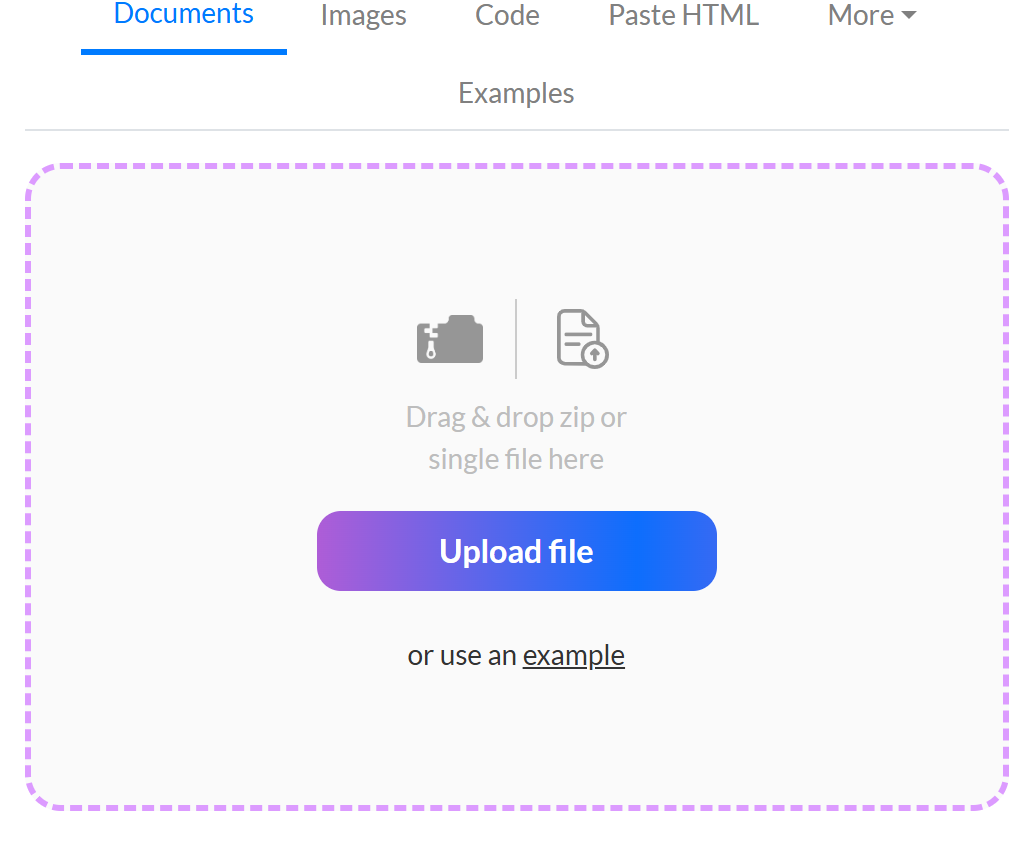
A zipped site goes into this box on tiiny.host.
How a site on Tiiny Host compares with GitHub Pages
| Website limit | Tiiny Host | GitHub Pages |
|---|---|---|
| Monthly bandwidth | 5 GB free, 10 GB on Tiny, 50 GB on Solo, 100 GB on Pro, 200 GB on Pro Max | 100 GB soft limit |
| Monthly visits | 5,000 free, up to 1,000,000 on Pro Max | No visit limit in GitHub’s documentation |
| Updates | 3 a day on the free plan, unlimited from Tiny | 10 builds an hour (soft limit) |
| Repository | Not needed | Required, and public on GitHub Free |
| Server-side code | PHP, Node.js, and Python apps from Tiny | Static files only |
| Business and ecommerce sites | Business features such as custom domains (Solo) and email capture (Pro) | Not intended for these, per GitHub’s documentation |
Figures from GitHub’s Pages documentation and the Tiiny Host help center, November 2026.
For a public open-source project site, GitHub Pages is free and capable.
I’d only move a site to Tiiny Host when one of the problems below shows up.
What makes people move a site off GitHub Pages
Designers and agencies who publish through GitHub Pages tend to describe the same frustrations, and Tiiny Host has an answer for each:
- Learning Git only to share a site: a zip dropped on Tiiny Host’s upload box becomes a link, with no commits or branches.
- Code that has to stay out of a public repository: a free GitHub Pages site needs a public repo, and a site uploaded to Tiiny Host needs no repository at all.
- A PHP contact form or a Node backend: GitHub Pages serves static files only, while Tiiny Host runs PHP, Node.js, and Python apps from the Tiny plan.
- A client preview that has to stay private: from the Solo plan, Tiiny Host’s password protection puts a password prompt in front of the site.
- A business site: GitHub’s documentation says GitHub Pages isn’t meant for an online business, an ecommerce site, or SaaS, and Tiiny Host’s paid plans add business features such as custom domains from the Solo plan and email capture from the Pro plan.
- No idea who is visiting: Tiiny Host’s analytics count visits from the Tiny plan, with no tracking script to add.
Moving a GitHub Pages site to Tiiny Host
You can leave GitHub completely or keep your code there, and both routes work on every Tiiny Host plan:
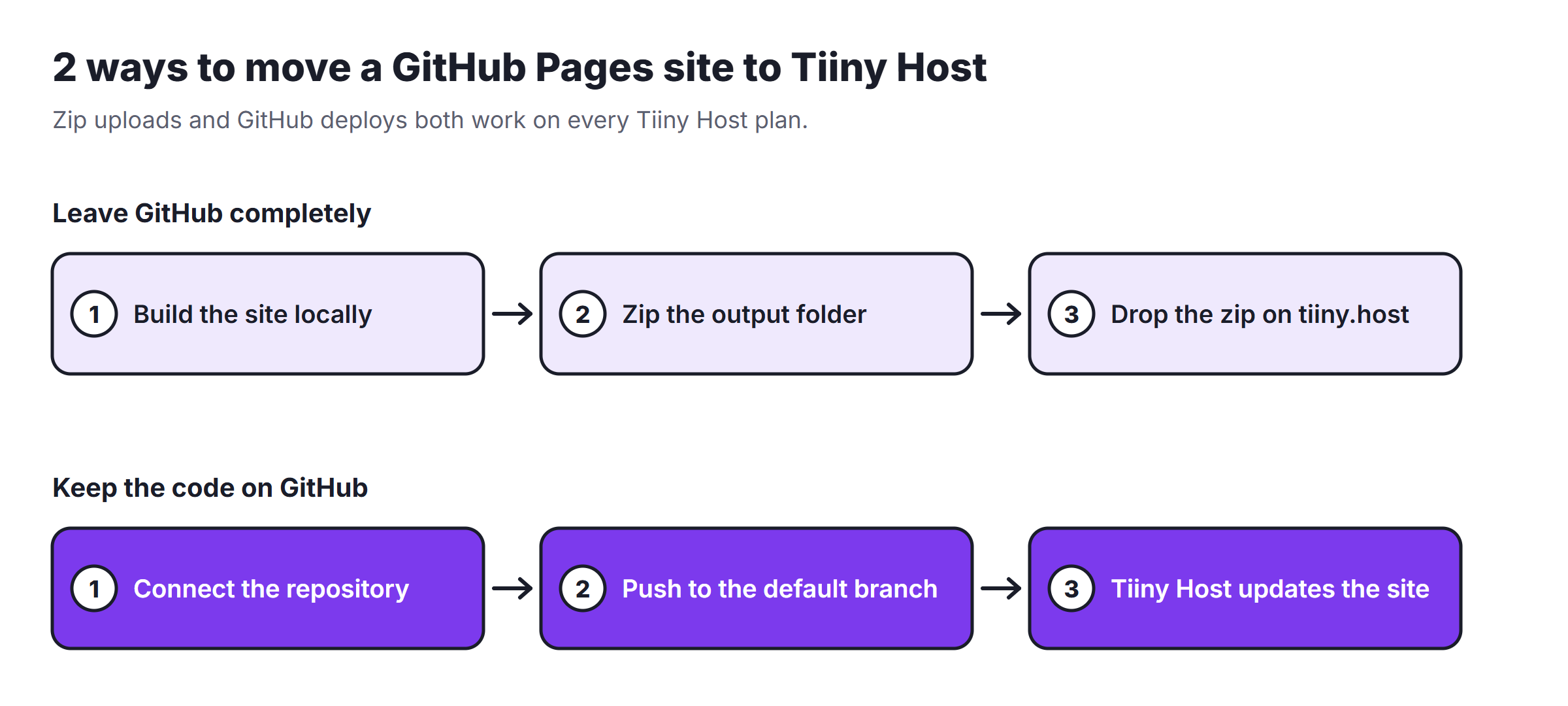
The zip route for leaving GitHub, and the repository route for keeping the code there.
With a connected repository, every push to the default branch updates the site, and Tiiny Host looks for the built site in folders named build, dist, out, www, static, _site, or docs (GitHub deploy guide).
That folder rule decides which route suits your site generator:
| Site generator | Default output folder | Route on Tiiny Host |
|---|---|---|
| Jekyll, Eleventy | _site | GitHub deploy or zip |
| Astro, Vite | dist | GitHub deploy or zip |
| Next.js static export | out | GitHub deploy or zip |
| Create React App | build | GitHub deploy or zip |
| Hugo | public | Zip the public folder |
Hugo’s public folder isn’t on Tiiny Host’s list, so for a Hugo site you’ll want to zip public after each build and upload it.
A repository deployed from GitHub can be up to 75 MB, with your plan’s project size limit applying on top.
Key features
- Upload a zip or a single file, or deploy from GitHub, on any plan.
- Server-side apps in PHP, Node.js, or Python from the Tiny plan.
- Visit counts and a QR code for each site from the Tiny plan.
- A password prompt, your own domain, and tracked links from the Solo plan.
- One link that stays the same after every update.
Pros
- Publishing needs no Git knowledge at all.
- Runs PHP, Node.js, and Python apps beyond what a static host serves.
- A password and visit counts for client previews.
Cons
- As a publishing tool, Tiiny Host doesn’t replace Git repositories or code review.
- Free accounts get a single project capped at 3 MB and 5 GB of monthly bandwidth.
- Custom domains start on the Solo plan, while GitHub Pages includes them for free.
- Leaving GitHub entirely means rebuilding and re-uploading a zip for each change.
Which Tiiny Host plan fits a former GitHub Pages site
Pick the Tiiny Host plan by the kind of site you’re moving, with prices checked in November 2026:
| Kind of site | Tiiny Host plan | Price a month, yearly or monthly billing | Traffic allowance a month |
|---|---|---|---|
| A one-page test or prototype | Free | $0 | 5,000 visits, 5 GB |
| A personal site with a PHP form or analytics | Tiny | $5 or $9 | 10,000 visits, 10 GB |
| Client previews on your own domain, behind a password | Solo | $13 or $18 | 100,000 visits, 50 GB |
| An agency hosting up to 15 client sites | Pro | $31 or $38 | 500,000 visits, 100 GB |
| A busy site that outgrows GitHub’s 100 GB soft limit | Pro Max | $74 or $89 | 1,000,000 visits, 200 GB |
Plan prices and allowances come from Tiiny Host’s pricing plans and plan limits help pages, and each paid plan carries a 7-day money-back guarantee.
Best for
- Agencies and freelancers handing clients a private preview link.
- Sites that need a PHP form or a small Node.js or Python backend.
- Anyone who wants a site online without touching Git.
The quickest test is to zip one of your existing GitHub Pages builds and drop it on tiiny.host.
Hosted code platforms closest to GitHub
These GitHub alternatives host your repositories and CI for you, and GitLab and Codeberg can import a project from GitHub with its issues.
2. GitLab: best all-in-one replacement
Of every platform in this guide, GitLab covers the most of what GitHub does: repositories, merge requests, issues, GitLab CI/CD, and GitLab Pages for static sites, with 400 compute minutes a month on the free plan (GitLab pricing).
Key features
- A GitHub importer that brings over issues, pull requests as merge requests, branches, release notes, collaborators, and Git LFS objects (GitLab docs).
- GitLab CI/CD, with 10,000 compute minutes a month on Premium.
- GitLab Pages, which turns a repository into a static website.
Pros
- The broadest feature set of any platform here.
- A detailed importer for whole GitHub projects.
Cons
- The free plan allows 5 users per top-level group, so you’ll want to check your team size before moving.
- GitLab has more menus and settings to learn than GitHub.
Pricing
GitLab Free includes 5 users per top-level group, 400 compute minutes a month, and 10 GiB of storage, while GitLab Premium costs $29 per user a month, billed annually, and GitLab Ultimate is priced by sales.
Best for
- Teams that want code and CI next to project planning in one platform.
3. Codeberg: best for open-source projects
For an open-source project, I’d recommend looking at Codeberg first: the free Git hosting service is run by the nonprofit association Codeberg e.V. on its own hardware in Berlin, using Forgejo as its software (Codeberg FAQ).
Key features
- A migration tool that moves a GitHub repository along with its issues, labels, wiki, releases, and milestones (Codeberg docs).
- Codeberg Pages for static websites.
- Woodpecker CI, available on request.
Pros
- Free, funded by donations and membership fees.
- A nonprofit host with servers in Germany.
Cons
- Codeberg is meant for free and open-source work: private repositories are limited to 100 MB for contributors to free software, and Codeberg doesn’t offer private hosting for commercial projects.
- Accounts are limited to 100 repositories unless you request more.
- CI access has to be requested.
Pricing
Free, with optional membership in Codeberg e.V.
Best for
- Open-source maintainers who want a nonprofit home for their project.
4. Bitbucket: best for teams on Jira
Teams that already plan their work in Jira get the most out of Bitbucket Cloud, Atlassian’s Git platform, which links code changes to Jira work items and is free for up to 5 users with unlimited public and private repositories (Bitbucket pricing).
Key features
- Bitbucket Pipelines for CI/CD, with 50 build minutes a month on the free plan.
- The Jira integration, tracing each change back to a Jira work item.
- Free community and academic subscriptions with unlimited private repositories.
Pros
- Low per-user prices on paid plans.
- A natural fit for teams that plan work in Jira.
Cons
- The free plan stops at 5 users and 1 GB of LFS storage.
- Bitbucket gives the most to teams that also use Jira and other Atlassian products.
Pricing
Free for up to 5 users, with Bitbucket Standard at $3.65 and Bitbucket Premium at $8 per user a month.
Best for
- Development teams already running their work in Jira.
Self-hosted GitHub alternatives
These GitHub alternatives run on a server you control, keeping your code and CI on your own infrastructure.
5. Forgejo: best free-software forge
For a forge you run yourself on free software, Forgejo is the natural choice: a lightweight forge that its project promises will always stay free software, built by a community under the umbrella of Codeberg e.V. (Forgejo).
Key features
- Forgejo Actions, a built-in CI system with workflows in a .forgejo/workflows folder (Forgejo docs).
- The same software that powers Codeberg.
Pros
- Free software with community governance.
- Light enough to run on a small server.
Cons
- You handle the server and its upgrades yourself.
Pricing
Free to download and self-host, with your own server as the only cost.
Best for
- Teams and individuals who want full control over their Git hosting.
6. Gitea: best for GitHub Actions compatibility
If your team depends on GitHub Actions, Gitea is the shortest move: Gitea Actions is compatible with GitHub Actions, and the self-hosted Gitea server is free under the MIT license with unlimited users and repositories (Gitea).
Key features
- Gitea Actions, built on the familiar YAML workflow format of GitHub Actions.
- Gitea Cloud, a managed version with a 30-day free trial.
- Gitea Enterprise with SAML single sign-on and audit logs.
Pros
- The easiest move for teams that depend on GitHub Actions workflows.
- A paid support option for companies.
Cons
- Self-hosting means running your own server, unless you pay for Gitea Cloud.
Pricing
Free to self-host, with Gitea Enterprise listed at $19 per user a month on a 1-year commitment, and a reduced $9.50 showing when I checked (Gitea pricing).
Best for
- Companies that want GitHub Actions compatibility on their own infrastructure.
A GitHub alternative for email-based development
7. SourceHut: best for patches over mailing lists
Developers who send patches by email will feel at home on SourceHut, a fully open-source forge built around mailing lists, where people who host projects pay what they can afford (SourceHut pricing).
Key features
- git.sr.ht for repositories, lists.sr.ht for mailing lists, and builds.sr.ht for CI.
- 100% open source, with installation docs for running SourceHut on your own servers.
Pros
- The same service at every price, with financial aid available.
- Contributors don’t need to pay to take part in projects.
Cons
- Email-based patches take adjustment for teams used to pull requests.
- During SourceHut’s public alpha, builds.sr.ht and chat.sr.ht require payment.
Pricing
$4, $8, or $12 a month, with the same features at each price.
Best for
- Developers who prefer mailing lists and patches over pull requests.
If you rely on GitHub Actions
CI takes the most work to move off GitHub.
Each platform in this guide handles it in its own way:
- Gitea Actions: compatible with GitHub Actions workflows, making Gitea the shortest path for heavy Actions users.
- Forgejo Actions: a built-in CI system with workflows in .forgejo/workflows.
- GitLab CI/CD: its own .gitlab-ci.yml format, with 400 compute minutes a month free.
- Bitbucket Pipelines: its own bitbucket-pipelines.yml format, with 50 build minutes a month free.
- Codeberg: Woodpecker CI, granted on request.
- SourceHut: builds.sr.ht, a paid feature during the public alpha.
Hosted vs self-hosted vs nonprofit: what you give up
- Hosted companies (GitLab, Bitbucket): little setup and polished CI, with per-user pricing once a team grows.
- Nonprofit hosting (Codeberg): free and community-run, with limits on private and commercial projects.
- Self-hosted (Forgejo, Gitea, or SourceHut on your own servers): full control and free software, with server upkeep as the cost.
- Website publishing (Tiiny Host): no Git to learn, plus passwords and visit counts on paid plans, with no repositories or code review.
Best GitHub alternative by situation
- Leaving GitHub as a team: GitLab, or Bitbucket if you use Jira.
- Moving an open-source project: Codeberg.
- Keeping code on your own servers: Forgejo, or Gitea for GitHub Actions compatibility and paid support.
- Working through mailing lists: SourceHut.
- Moving a GitHub Pages site: Tiiny Host, GitLab Pages, or Codeberg Pages.
Switching from GitHub: a quick checklist
Based on my experience moving sites between hosts, the CI setup and the website take longer than the code itself, so it’s ideal to start with an inventory:
- List what you use on GitHub beyond repositories, such as Actions, Pages, Packages, and issues.
- Use the destination’s importer: GitLab imports issues and pull requests, and Codeberg’s migration tool moves issues, labels, wiki, releases, and milestones.
- Rewrite CI workflows for the new platform, or pick Gitea to keep GitHub Actions syntax.
- Move your GitHub Pages site, either to the new platform’s Pages feature or to Tiiny Host from a zip.
- Update links in your README and documentation.
- Decide whether to leave a read-only GitHub mirror so existing links and stars keep pointing somewhere useful.
What is the best GitHub alternative?
GitLab is the best all-in-one GitHub alternative in 2026, with code, CI/CD, issues, and GitLab Pages in one platform and a free plan for up to 5 users per group.
Open-source maintainers usually do better on Codeberg.
Teams that want their own server can pick between Forgejo and Gitea.
For the GitHub Pages part of GitHub, Tiiny Host publishes a website from a zip, with no Git needed.
FAQs: GitHub alternatives
Is Codeberg free?
Yes, there’s no charge for Codeberg, because the nonprofit Codeberg e.V. pays for it through donations and member fees.
Codeberg is meant for free and open-source projects.
Its private allowance covers personal notes and side projects of free-software contributors.
Is there an alternative to GitHub Actions?
Yes, Gitea Actions works with GitHub Actions-style workflows, and Forgejo Actions, GitLab CI/CD, and Bitbucket Pipelines are built-in alternatives with their own workflow files.
GitLab vs GitHub: which should you use?
GitLab suits teams that want code, CI/CD, and planning in one product, with Premium at $29 per user a month billed annually.
GitHub suits most open-source projects and teams that rely on GitHub Actions, with a free plan that includes unlimited repositories and 2,000 CI/CD minutes a month.
Why are developers leaving GitHub?
The reasons developers give in 2026 include GitHub Actions reliability, the Zig project’s main complaint when it moved to Codeberg in November 2025, and a preference for nonprofit or self-hosted forges.
What is the best free GitHub alternative for private repositories?
Bitbucket and GitLab both host private repositories for free, Bitbucket for up to 5 users and GitLab for 5 users per top-level group.
Codeberg is a weaker fit for private work, since its private allowance is capped at 100 MB.
Can Tiiny Host replace GitHub?
Tiiny Host can replace GitHub Pages for publishing websites, from a zip upload or a GitHub deploy.
Tiiny Host doesn’t host Git repositories; code review and CI need one of the other platforms in this guide.
GitHub alternatives: related guides
- Tiiny Host vs GitHub Pages
- GitHub Pages vs Cloudflare Pages
- Vercel vs GitHub Pages
- How to host a website on GitHub
- Free static website hosting
- Host a zipped site
- Tiiny Host comparisons
Final verdict
GitHub’s free plan still suits most projects, and I’d move only when CI reliability or GitHub Pages limits are holding a project back.
For a team, my pick is GitLab, or Bitbucket when Jira already runs your planning.
For an open-source project, I’d choose Codeberg.
If what you need is a website online, I’d pick Tiiny Host, since one upload of a zipped site gives you a shareable link, and passwords and analytics are there when a project calls for them.
Try Tiiny Host free at tiiny.host.
Last updated November 2026.
Checked in November 2026: each platform’s prices and limits on its own site or docs, and Tiiny Host’s plans in the Tiiny Host help center.
Git platforms revise plans from time to time; confirm today’s limits before moving a large project.