
- In short:
- What is GitHub Pages?
- What is Cloudflare Pages?
- Choose a host that gets your file live faster
- Conclusion
- FAQs: Cloudflare Pages vs GitHub Pages
I’ve been testing a lot of hosting platforms this year and most “Cloudflare Pages vs GitHub Pages” comparisons do not talk about the problems that a non-technical person would face. I had come across a lot of issues that seemed to be faced only by me, but upon further research on public forums like Hacker News and Reddit, I realized that was not the case.
Cloudflare has introduced Workers and now is steering people towards it rather than Pages, and GitHub Pages has commercial-use limitations.
I always try to look through the apps as a beginner or non-technical person would, because with AI becoming more helpful each day in building applications, more people are trying to get their websites online.
My initial thoughts were that GitHub Pages and Cloudflare Pages need some time for you to get hands-on. You need to spend at least an hour to understand how these work. I don’t think this would be a problem for most people; they would be keen to learn. Naturally, the next thing to check out and compare was the features and the experience of getting the website live.
So, let’s get to it. I tested both of them, and here’s how they compare.
In short:
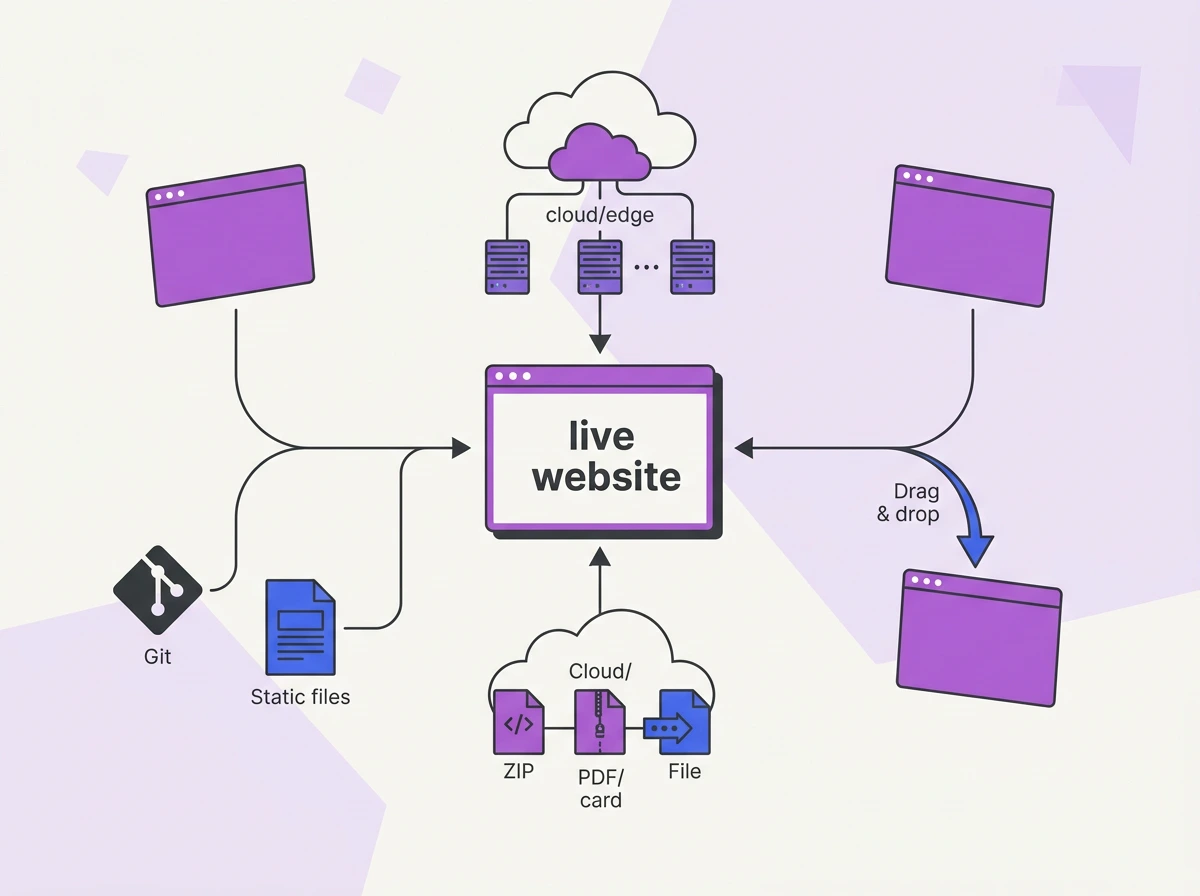
GitHub Pages is good if you are a maintainer or you already use GitHub frequently. If you need a website for commercial use, GitHub Pages isn’t ideal. Cloudflare Pages has a very generous free tier for static sites or even server-side rendered applications. The interface is not exactly user-friendly, but the offerings make up for it. If you want to publish a finished file like a PDF, Images, DOCX, or more, you can use file-first hosts like Tiiny Host.
What is GitHub Pages?

GitHub Pages is a free static site hosting service by GitHub. It lets you publish your repository to a website. It specifically supports static sites, so it publishes HTML, CSS, and JavaScript files from your GitHub repository without the need for any server-side script.
GitHub Pages becomes really helpful for personal portfolios, documentation, blogs, and simple sites. When you push changes to the repository, it gets built and published to the site hosted through GitHub Pages.
Why do people choose GitHub Pages?
It supports Jekyll, a static site generator, but you can push files to a repository and host them, or even use other tools via GitHub Actions.
If you are a developer or in a technical field, you can take some time to go through the documentation and start using it. Once you set up your repository, it will become easier for you to publish the website.
When I started out as a student, GitHub Pages was my go-to for getting my website online because I didn’t have to try out any other apps. Also, as a beginner, I created front-end pages without backend logic, so it was easy to get them live.
For any personal websites, the GitHub free version is enough to work with. GitHub Pages has support for:
-
Connecting custom domains to GitHub Pages, which you can do by pointing a CNAME record at your site.

- A free github.io subdomain which looks like username.github.io/project-name.

- Jekyll (pages generated using a static site generator)
- Automatic builds on every push (or via GitHub Actions)

GitHub Pages is widely used for documentation websites. It is quite easy to get it live directly from GitHub, and whenever you update it, it gets pushed to the main page directly too. Developers and teams who use GitHub generally have their documentation hosted through Pages.
Any student developers wanting to publish their website also prefer GitHub Pages because it doesn’t cost anything. You don’t need to attach your credit card either. If your team is on GitLab instead of GitHub, GitLab Pages works similarly to GitHub Pages.
When not to choose GitHub Pages?
Well, if the terms I just used in the sections above do not make sense, and you are just a beginner or non-developer, you can choose apps like Tiiny Host, Vercel Drop, or Netlify Drop for an easier workflow.
The major block for me while publishing was how many steps I had to go through after getting my files online. You have to go to settings and make sure your repository is published, and then get it live. That step took the majority of the time. There were some repositories that were private, and I wanted to get them live, but it wasn’t possible to do so without making them public.
In general, here’s where GitHub Pages fell short for me:
- GitHub Pages only publishes from public repositories on the free plan. If you want to get a website live from a private repo, you need to upgrade to one of the paid plans like GitHub Pro or Team.

- It is for static hosting only. If you have an app that needs a backend, database, authentication, or support for APIs, GitHub Pages isn’t for you. You should check out Cloudflare, Netlify, or Vercel.
- It doesn’t support converting your files, such as PDF, DOCX, and XLSX, or others into a website. You need to check a file-first host if you want to publish that.
- GitHub has native support for Jekyll builds. Other static site generators like Hugo need a custom GitHub Actions workflow.
- You cannot use GitHub Pages for commercial use if it is transactional. It is against GitHub’s terms.

- If you have a high-traffic or asset-heavy website, it would hit soft limits quickly, and performance would start to degrade.
- GitHub supports only a fixed list of Jekyll plugins, so any new plugins would produce build issues.
- There are no web analytics present for the pages you publish.
GitHub Pages Limits
According to GitHub Pages, the free hosting comes with certain soft limits. When you reach those limits, your account isn’t charged, and your website doesn’t go down either, but you may get performance issues.
Some limits that might affect your build:
- Recommended repository size: 1GB
- Size of the published site: 1GB
- Bandwidth limit for the website: 100GB/month
- Build limit: 10 builds per hour
These limits are in the documentation, but you don’t really hit them easily on smaller projects and personal websites.
What is Cloudflare Pages?

Cloudflare Pages is Cloudflare’s platform to deploy static websites and full-stack applications through its global network. It is built for JAMstack sites and serves them through Cloudflare’s CI/CD pipeline. You can either upload your files or connect a Git repo for auto-building.
Cloudflare is widely known in the developer community for its worldwide edge locations, so there is a near-zero cold-start problem. While Cloudflare started Pages to host static websites only, over time it has evolved to support server functions to add dynamic logic without ever touching a server. This was done using Pages Functions.
Cloudflare became popular for full-stack app deployments and static websites with large assets. The free plan is very generous and especially useful for developers because there are no bandwidth limits.
If you have any full-stack apps, apps with larger assets and frequent builds, small projects, or pages with sudden traffic spikes, you can use Cloudflare Pages.
If these words are confusing you and you are not really looking to deploy dynamic websites, you can check out Tiiny Host to get your website or file live without having to learn anything technical.
Shifting from Cloudflare Pages to Cloudflare Workers

Since April 2025, Cloudflare has been actively pushing developers to use Cloudflare Workers that support static hosting and server-side rendering too. Pages is still fully supported but Cloudflare is actively working on adding features and improvements to Workers. Even on their recent website, in Workers best practices, they mention that migrating to Workers is a good option.
When you click on New Application on Cloudflare’s dashboard, you don’t see Pages as a highlighted option anymore. You see a small line on the deployment site that takes you to the Pages deployment workflow.
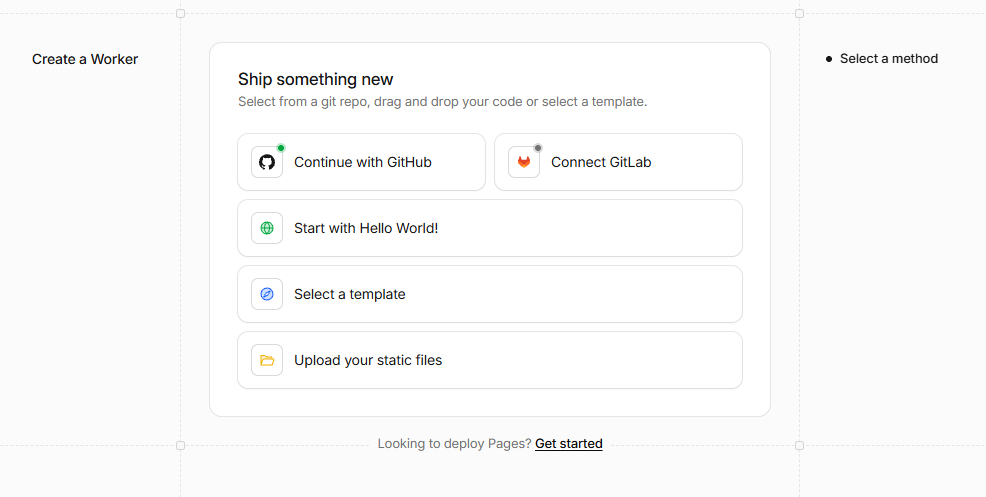
Workers have basically just absorbed Pages into it. All the things you could do on Pages, you can do using Workers. Pages only highlighted support for static sites, but with Workers, the experience was upgraded, and you could have serverless compute too. Cloudflare’s docs help you migrate an existing Pages project over to Workers.
If you are still wondering what Workers do, they are lightweight V8 isolates, and your code runs inside them. They support a wide variety of programming languages too. For simplicity, you can deploy your static site with a worker. A single Worker can handle every incoming request for your site.
Is Cloudflare Pages being discontinued?
No, Cloudflare Pages isn’t being deprecated. Projects that have been deployed will keep running and will get fixes. While Cloudflare is pushing people to use Workers, Pages is still fully supported.
If your project already lives on Cloudflare Pages, you can choose to keep it as is. If you are starting a new project, choosing Workers might be the right direction. This is where Cloudflare’s active development is going. You can always choose to migrate later; there’s no need to panic or rush to do so.
Why do people choose Cloudflare Pages?
If you compare the soft limits to Cloudflare Pages’ free tier, Cloudflare wins. And then if you have an app that is just more than a static site, GitHub Pages can’t help you.
- Cloudflare’s free tier has unlimited bandwidth, unlimited sites, free SSL, and DDoS protection. That’s why it becomes a natural choice for developers. When I hosted my app on Cloudflare, I didn’t have to worry about reaching limits at all.
- 300+ edge locations worldwide serve your websites fast wherever your visitors are.
- With Workers, you can add dynamic features. You can use KV (key-value storage), R2 (object storage), D1 (SQLite database), Durable Objects, and more.
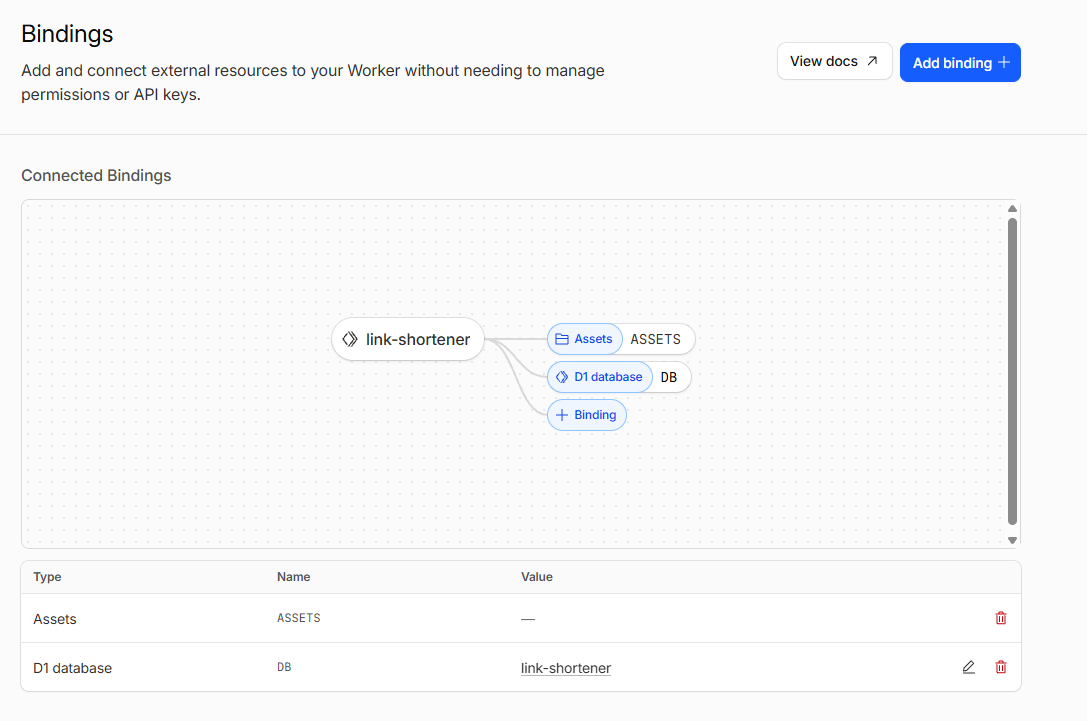
- Cloudflare Web Analytics is built-in and can be switched on quickly through the “Web Analytics” from the left pane.

If you want to use Workers, though, you have to add Wrangler.toml/.json to the setup configuration. You get to choose the framework in the build step and the build directory too.
Many teams use Cloudflare for DNS; the same teams can use the platform to host their MVPs, projects, Next.js static exports, SSG outputs, landing pages, or even documentation sites.
When not to use Cloudflare Pages?
For developers and teams, these limitations might not be an issue for you. If you are hosting your first website, Cloudflare can feel complex to work with.
- There is no “New Application” or “deploy” option directly on the main dashboard if you have any projects live already, so it takes time to figure out.

- On Pages, you can only publish a static site. If you want to go beyond that, you have to migrate to Workers, which means adding the configuration file. This can become a little complicated to work around especially if you are a beginner.
- There is a certain learning curve where you have to understand the platform a little bit and also Wrangler and config files.
- The whole dashboard prioritizes Workers, so static hosting takes some workaround.
- One limit that teams might hit on the free plan is 500 builds per month. If the build has just started, you might reach that point very quickly. In that case, you might want to upgrade to one of their paid plans.
Choose a host that gets your file live faster
Cloudflare Pages and GitHub Pages are both great options to work with. They become quite complicated for non-developers, though.
Sometimes you just hit a file-size limit and want to host a file online to share, or you want to publish a static site quickly. Maybe you are testing different AI outputs, hosting sites made with static site generators, or just building and sharing MVPs. For these, you should check out Tiiny Host.
You can upload within two minutes by just dragging the files. With Tiiny Host, you can host files and then access them from any device. Built-in analytics so you can keep track of the visitors without any additional integrations. There is also an option for password protection, so you can keep your files safe.
If you are happy with spending some time learning Git and know that you’ll frequently work with GitHub, add GitHub Pages to your everyday tool.
If you have a website or application that is currently a static site but might become a full-stack application, choose Cloudflare Pages.
| GitHub Pages | Cloudflare Pages | Tiiny Host | |
| Time to first live site | 10–30 minutes | 20–60 minutes | Under 2 minutes |
| Technical knowledge needed | Some (GitHub account + basic file upload) | Medium (accounts + connecting Git + settings) | None |
| Supports non-code files? | No | No | Yes, supports more than 150 file formats. |
| How you upload | Upload files via website or Git | Connect Git repo or direct upload | Drag & drop ZIP or single file |
| Free custom domain | Yes | Yes | No |
| Updating the site later | Re-upload or push changes | Automatic if connected to Git | Re-upload the whole ZIP; can use Git too |
| Long-term suitability | Good for personal sites & portfolios | Best if the site might grow | Good if you have files you want to store, share, and update |
| Best for | Technical professionals, doc maintainers, and anyone whose files already exist on GitHub. | Teams using Cloudflare for DNS, and anyone deploying full-stack apps. | Freelancers, students and marketing Professionals |
Conclusion
The tool you choose depends on how fast you want the website live, the time you want to spend learning the tool, and if you are going to stick to a static site or move into a dynamic app.
Tiiny Host becomes your obvious choice if you need quick uploads to share. GitHub Pages is the next if you want to host static sites only, but you have to give it some time. Cloudflare is your choice if you want a system that will help you with advanced features even on the free plan. If your team uses Cloudflare DNS, you should just use Cloudflare Pages to host apps and documentation too.
Deploying your first site? Get your website live within minutes using Tiiny Host.
FAQs: Cloudflare Pages vs GitHub Pages
Is Cloudflare Pages better than GitHub Pages?
It depends on one thing: whether “static and simple” is enough for you. If your site is static and the repo can be public, and it already lives on GitHub, GitHub Pages is the faster, simpler win. If you need a private source, unmetered bandwidth, analytics, commercial use, or a path to dynamic features, Cloudflare Pages has the headroom. There is no universal winner, and anyone who gives you one is selling something.
Is Cloudflare Pages really free and unlimited?
The bandwidth genuinely is unmetered, and that is not a trick. But “unlimited” has edges. The free plan caps you at 500 builds a month, 20,000 files per site, and 25 MiB per file, with one build running at a time. For a normal site, you will not notice. For a busy team pushing constantly, the build cap is the one to watch.
Can I use GitHub Pages with a private repository?
Not on the free tier. Pages on a private repository needs a paid plan such as GitHub Pro or Team. If keeping your source private matters and you would rather not pay for it, that is exactly what pushes people toward Cloudflare Pages.
Can I use GitHub Pages for a business or e-commerce site?
For a store that takes payments, no. GitHub’s terms rule out running an online business, e-commerce, or commercial SaaS on Pages. A company blog, product documentation, or a marketing site is generally fine. The line is about processing commercial transactions, not about being a company.
Is GitHub Pages going away?
No, and neither is Cloudflare Pages. Both are supported. The only shift is on Cloudflare’s side, where new feature work now goes to Workers rather than Pages.
How can I move from GitHub Pages to Cloudflare Pages?
The deployment wouldn’t be difficult for a simple static website. You can connect your GitHub repository, and it will get the website live. If you are using Workers on Cloudflare, you might have to add wrangler.toml/json for the build step.